At a glance
- Display type
- Sony Micro-OLED (latest-gen panels)
- Resolution
- 1920x1200
- Field of view
- 52°
- Refresh rate
- 120 Hz
- Brightness
- 1500 nits
- Weight
- 83 g
- Full camera-based 6DoF and hand gestures in glasses form factor
- Brightest of the family at 1500 nits
- $599 — most expensive Luma
- Spatial features tied to SpaceWalker ecosystem/host support
VITURE Luma Ultra XR/AR Glasses
VITURE
7.5/10 “According to the aggregated consensus of reviewers, the VITURE Luma Ultra is the display benchmark of the current XR glasses crop, held back by software that has not caught up to its cameras. Sportskeeda calls it one of the best AR glasses with a display that money can currently buy, and 9to5Mac judges its tri-camera tracking a night-and-day step over earlier models, while Gaming Nexus counters that it is more of a developer device that needs the Pro Neckband to shine, and Tom's Guide notes the working combo lands near $900 -- Quest money. Comfort and the recorded 1,500-nit picture are consensus strengths; finicky SpaceWalker software and unreliable hand tracking are the consensus gripes. Scores below are an editorial aggregate of that cited coverage, not AR Compare hands-on measurements.” Read the full review$599
Check price at Amazon- Field of view
- 52°
- Weight
- 83 g
- Brightness
- 1500 nits
The VITURE Luma Ultra XR/AR Glasses are display glasses for media, gaming, and productivity from VITURE, released 2025-08. They feature a 1920x1200 per-eye Sony Micro-OLED (latest-gen panels), 52° field of view, 1500 nits perceived brightness, 120Hz refresh rate. Weight is 83g. Best for: Prosumers, enterprise users and tinkerers who want 6DoF spatial computing and hand tracking without a full headset.
Our review
By AR Compare Team ·
According to the aggregated consensus of reviewers, the VITURE Luma Ultra is the display benchmark of the current XR glasses crop, held back by software that has not caught up to its cameras. Sportskeeda calls it one of the best AR glasses with a display that money can currently buy, and 9to5Mac judges its tri-camera tracking a night-and-day step over earlier models, while Gaming Nexus counters that it is more of a developer device that needs the Pro Neckband to shine, and Tom's Guide notes the working combo lands near $900 -- Quest money. Comfort and the recorded 1,500-nit picture are consensus strengths; finicky SpaceWalker software and unreliable hand tracking are the consensus gripes. Scores below are an editorial aggregate of that cited coverage, not AR Compare hands-on measurements.
- Display quality
- 9/10
- Comfort
- 8/10
- Battery life
- 5.5/10
- Value for money
- 7/10
- Build quality
- 6.5/10
- Software
- 6/10
The VITURE Luma Ultra is the prosumer flagship of VITURE’s Luma-generation display glasses: the only model in the family with three cameras and full 6DoF spatial tracking, launched in August 2025 at $599. This review aggregates the hands-on record — Sportskeeda’s long-term review, 9to5Mac’s extended Mac-workflow review, Tom’s Guide’s real-world test with the Pro Neckband, Gaming Nexus’s detailed and most critical writeup, Impulse Gamer’s full-ecosystem review, and Android Central’s lineup-framing hands-on — alongside VITURE’s published specifications. AR Compare has not performed hands-on testing of this device; every observation below is attributed to the cited sources, and the category scores are an editorial aggregate of cited reviewer sentiment. Product facts were cross-checked against AR Compare’s spec record for the Luma Ultra (dual Sony Micro-OLED at 1920x1200 per eye, a recorded 52-degree field of view, a recorded 1,500 nits, a 120Hz refresh rate, roughly 83 grams, tri-camera 6DoF, $599).
How This Review Was Compiled
The sources vary in depth and angle. Sportskeeda’s Angshuman Dutta published the fullest everyday review, built on weeks of use, 9to5Mac’s Ben Lovejoy tested it as a portable Mac monitor against his Vision Pro experience, and Tom’s Guide’s Jason England wore the full Luma Ultra plus Pro Neckband setup in public. Gaming Nexus went deepest on design flaws, Impulse Gamer covered the gaming ecosystem end to end, and Android Central’s Nicholas Sutrich positioned it against the XREAL One line. Where the sources disagree — chiefly on whether the spatial features justify the price — both readings are reported below rather than smoothed over.
The Three Cameras: Why the Luma Ultra Exists
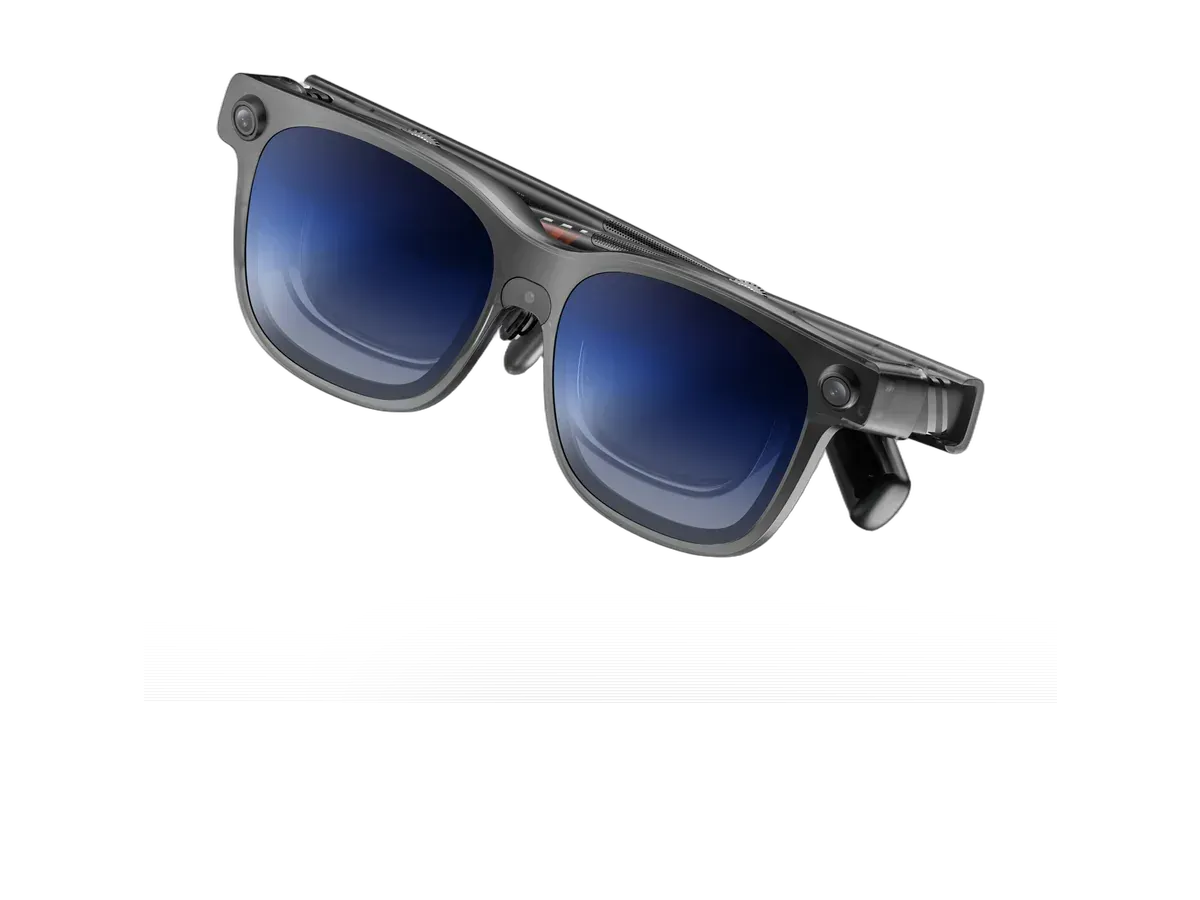
On what the Luma Ultra is, the record speaks as one: a Luma Pro with a brighter panel, two extra cameras, and full 6DoF tracking. Most display glasses offer 3DoF, which only follows head rotation — lean toward the screen or walk around it and the illusion breaks. The Luma Ultra’s three cameras (one at the nose bridge, two at the outer corners) add positional tracking, so virtual screens hold their place in the room as you move. 9to5Mac calls the result a night-and-day comparison with earlier models: virtual monitors are dramatically better at staying where you put them, down to the Vision Pro trick of leaving the house and returning to find them waiting. Tom’s Guide reached a similar arc, reporting that a platform which was a bit of a mess at the Pro Neckband’s debut has matured into a solid on-the-go spatial computing experience.
The dissent is about what all that hardware needs to work. Gaming Nexus points out there is no onboard chip doing the processing, so 6DoF only exists inside SpaceWalker on a phone, computer, or VITURE’s Pro Neckband — unlike the XREAL One Pro, which pins the screen with a button press on anything that outputs video. Android Central lands on the same complaint, wishing VITURE could support spatial tracking without extra software. Hand tracking draws the most consistent criticism: Tom’s Guide describes waving and pinching wildly before the system responds, Gaming Nexus needed several tries to register grabs in VITURE’s demo games, and Android Central judges the feature mostly relegated to tech demos, not a reason to buy. The aggregated read on whether the 6DoF features actually matter is conditional: reviewers who built their workflow around anchored multi-monitor work or the spatial demos found real value, while those who mainly watch a single screen say the cheaper 3DoF models cover them.
Is the Display Really the Best in Class?
On the picture itself the record is close to unanimous. Sportskeeda says it plainly: sharp and vibrant indoors and out, no glare in a park, cafe, railway station, or bus, and the glasses to get for a robust visual experience — praise capped with a flat statement that the reviewer cannot praise the display enough. Gaming Nexus ranks it among the best AR glasses displays it has reviewed, clear edge to edge with a big sweet spot, and notes the 16:10 panels give usefully more vertical room than the usual 1080p glasses. The recorded 52-degree field of view sits second in VITURE’s family behind the Beast’s 58 degrees, and the recorded 1,500 nits — the brightest of the family — proved so strong that Gaming Nexus dialed it down for movies. The caveats are familiar birdbath-optics ones: Gaming Nexus saw torso reflections in certain lighting, and text is sharp enough for media but jagged enough that the reviewer would not do development work on it. Gaming Nexus adds one honest ceiling: marketing says 4K-like, but what you get is a very clear, bright 1200p.
Comfort, Audio, and the No-Battery Question
Does the Luma Ultra have a built-in battery? No — like nearly all display glasses it draws power over its cable from whatever feeds it, which is why the battery score here reflects category convention rather than a standalone runtime. Sportskeeda measured the practical cost as a 3 to 4 percent iPhone 15 battery drop across a few minutes of high-end gaming, and Tom’s Guide got roughly 3.5 hours from the Pro Neckband powering the full spatial setup. Comfort is a consensus strength at a recorded 83 grams (VITURE and several reviewers quote 77 grams for the frame): 9to5Mac happily wore them for many hours where the Vision Pro’s weight and heat registered within one, Gaming Nexus reports no eye fatigue across long sessions, and Sportskeeda stayed comfortable through hours in public. Audio is the softer spot — Impulse Gamer found the open-ear speakers surprisingly loud and clear in quiet rooms, but Sportskeeda calls them a mixed bag that any noisy environment overpowers, recommending headphones for commutes.
Build quality is where reviewers pause. Gaming Nexus experienced cracked temples on an earlier Luma-series review unit and Sportskeeda notes social-media reports of the same, though VITURE says current production runs are fixed. Gaming Nexus also dislikes the new clip-on prescription frame, which wiggles visibly during head movement — a real problem on glasses designed for moving around — and notes the magnetic connector can knock loose when lying on your side. The built-in myopia dials, per 9to5Mac a casualty of the 6DoF hardware, stop at -4.0D where other VITURE models reach further, pushing stronger prescriptions to inserts.
Viture Luma Ultra vs Beast, Luma Pro, and XREAL One Pro
The vs-Beast question has a crisp aggregated answer: the VITURE Beast is the better all-round consumer pick — Tom’s Guide says exactly that — with a wider 58-degree view, flat prism optics, and built-in 3DoF for $50 less, while the Luma Ultra is the one to buy specifically for cameras, hand tracking, and true 6DoF anchoring. The full spec-by-spec breakdown lives in AR Compare’s Beast vs Luma Ultra comparison. Against the Luma Pro, Android Central summarizes the delta as a brighter panel, two extra cameras, and 6DoF on an otherwise shared design, at $100 more. Against the $599 XREAL One Pro, the trade is philosophical: Gaming Nexus and Android Central both note XREAL’s onboard chip makes spatial pinning plug-and-play with zero software, while VITURE counters with a brighter panel, Switch 2 support through its dock, and SpaceWalker’s power-user features — multiple tracked windows and a 2D-to-3D video mode Android Central rates utter voodoo magic that works almost flawlessly.
Value
At $599, the Luma Ultra is the most expensive Luma, and the record treats that price two ways. Sportskeeda judges it a solid device well worth its price in the VITURE-versus-XREAL fight, and 9to5Mac frames it as a fraction of Vision Pro money for most of the portable-monitor experience. The skeptics count the accessories: Gaming Nexus argues you need the Pro Neckband to get the most out of it, and Tom’s Guide runs the math on the combo at nearly $900 — VR headset money, a couple of Quest 3S consoles’ worth — before concluding it still earns its keep for ultra-portable use cases. The aggregate advice is to buy it only if the cameras matter to you; if they do not, the same money buys the Beast’s wider view or a One Pro’s simpler setup.
Who Should Buy the VITURE Luma Ultra
Per the aggregated consensus: prosumers and tinkerers who want headset-style 6DoF anchoring and hand tracking in a glasses form factor, travelers who want the best-in-class bright panel for work and media on planes and in cafes, and Switch 2 or multi-device gamers invested in VITURE’s dock-and-neckband ecosystem. Who should skip: buyers who mostly watch a single screen and will never touch the spatial features, anyone unwilling to troubleshoot finicky companion software, stronger-prescription users beyond the -4.0D dials who would depend on the wobbly clip-in frame, and value shoppers for whom the neckband-inclusive total crosses into VR-headset territory.
Scores are aggregates of the cited reviews and hands-on reports, not AR Compare hands-on results.
Sources
- Sportskeeda — Viture Luma Ultra Review: A stunning display and almost all the right ingredients
- 9to5Mac — The Viture Luma Ultra is almost the Apple Vision Air I’d like to see
- Tom’s Guide — Viture Luma Ultra and Pro Neckband, worn in public: the real-world test
- Gaming Nexus — VITURE Luma Ultra Review
- Impulse Gamer — VITURE Luma Ultra XR Glasses Review (Full Ecosystem Review)
- Android Central — Viture Luma Ultra hands-on and limited edition Cyberpunk smart glasses
- VITURE — Luma Ultra XR Glasses official product page (specifications)
What other reviewers say
1 review from an outside outlet.
Scores from other outlets, as published — not our rating.
| Source | Score |
|---|---|
| Sportskeeda | one of the best AR glasses with a display that money can currently buy |
Pros & cons
Pros
- Full camera-based 6DoF and hand gestures in glasses form factor
- Brightest of the family at 1500 nits
- 6DoF supported across Pro Neckband, macOS and Windows
- Light for a tri-camera device (~77g per hands-on reviews)
- Virtual monitors that finally stay put: reviewers call the tri-camera tracking a night-and-day improvement over earlier models
- A picture reviewers rank among the very best in display glasses, sharp edge to edge with a wide sweet spot
- Comfortable across hours-long sessions in multiple long-term reports, where a full headset grew heavy within one
- Real-time 2D-to-3D video conversion described as working almost flawlessly when the host hardware keeps up
- Ecosystem reach reviewers single out, from Steam Deck and ROG Ally X to Switch 2 through the add-on dock
Cons
- $599 — most expensive Luma
- Spatial features tied to SpaceWalker ecosystem/host support
- Myopia adjustment tops out at -4.0D (base Luma goes to -6.0D)
- Hand tracking still misfires in reviewer reports, taking several tries to register pinches and grabs
- Companion software reviewers describe as finicky, needing firmware updates and repeat reconnections before it behaves
- Early-batch temple cracking reports and a wobbly clip-on prescription frame give reviewers build-quality pause
- Open-ear audio that noisy surroundings easily overpower, per more than one review
- No onboard power source, so runtime depends entirely on the phone, laptop, or neckband feeding it
Full specifications
Specs last verified
| Display | |
|---|---|
| Display type | Sony Micro-OLED (latest-gen panels) |
| Resolution | 1920x1200 |
| Field of view (°) | 52 |
| Refresh rate (Hz) | 120 |
| Brightness (nits) | 1500 |
| Virtual screen size (in) | 152 |
| Color support | Full color |
| Not published: Pixels per degree, HDR support | |
| Optics | |
| Optics type | birdbath |
| Dimming control | ✓ Yes |
| Prescription support | ✓ Yes |
| Prescription options | Built-in dials, -4.00 to 0.00 · Inserts / lens frame, -16.00 to +12.00, cyl up to 6.00 |
| Not published: Transparency level | |
| Physical | |
| Weight (g) | 83 |
| Foldable | ✕ No |
| Not published: Frame style, Color options, IP rating | |
| Connectivity | |
| Connectivity | USB-C (DP Alt Mode) |
| Compatible devices | Android, iOS, PC, Mac, Steam Deck, Nintendo Switch 2, PlayStation, Xbox, ROG Ally, Lenovo Legion Go, iPad |
| Not published: Tethered | |
| Computing | |
| Operating system | iPhone, Android, Mac, PC, Switch/Switch 2, Steam Deck |
| Chipset | Host-powered (6DoF works on Pro Neckband, macOS, Windows via SpaceWalker) |
| Not published: Processing type | |
| Sensors & input | |
| Camera | ✕ No |
| Speakers | open-ear |
| Tracking | 6DoF |
| Not published: Microphones, Gesture control, Voice control | |
Prescription options
The documented prescription routes for the VITURE Luma Ultra XR/AR Glasses, from the maker and named-partner documentation recorded in our database.
- Built-in dials, -4.00 to 0.00 Source: shop.viture.com documentation
- Inserts / lens frame, -16.00 to +12.00, cyl up to 6.00 Source: viture.com documentation
Maker documentation as recorded 2026-09-17. Ranges are the maker's published limits, not medical advice — confirm your exact prescription with your optician before ordering.
Read the VITURE prescription guide for every documented option, model by model.
Where to buy
Price verified
VITURE Luma Ultra XR/AR Glasses specs: quick answers
- What is the VITURE Luma Ultra XR/AR Glasses's field of view?
- The VITURE Luma Ultra XR/AR Glasses has a 52-degree field of view.
- What is the VITURE Luma Ultra XR/AR Glasses's display resolution?
- The VITURE Luma Ultra XR/AR Glasses's recorded per-eye display resolution is 1920x1200.
- How bright is the VITURE Luma Ultra XR/AR Glasses's display?
- The VITURE Luma Ultra XR/AR Glasses has a rated peak brightness of 1500 nits.
- How much does the VITURE Luma Ultra XR/AR Glasses weigh?
- The VITURE Luma Ultra XR/AR Glasses's glasses weigh 83g according to the manufacturer specification.
- How much does the VITURE Luma Ultra XR/AR Glasses cost?
- The VITURE Luma Ultra XR/AR Glasses costs $599.
VITURE Luma Ultra XR/AR Glasses: FAQs
How much does the VITURE Luma Ultra XR/AR Glasses cost?
The VITURE Luma Ultra XR/AR Glasses costs $599 (USD). It is available from 2 retailers listed on this page.
What field of view does the VITURE Luma Ultra XR/AR Glasses have?
The VITURE Luma Ultra XR/AR Glasses has a recorded field of view of 52 degrees.
How much does the VITURE Luma Ultra XR/AR Glasses weigh?
The VITURE Luma Ultra XR/AR Glasses weighs 83g according to the manufacturer specification.
Can I use the VITURE Luma Ultra XR/AR Glasses with prescription lenses?
Yes, the VITURE Luma Ultra XR/AR Glasses supports prescription lenses. The recorded diopter range is Built-in myopia adjustment up to -4.0D; clip-on Rx frame for astigmatism/hyperopia (SPH -16 to +12, CYL 6).
What devices work with the VITURE Luma Ultra XR/AR Glasses?
The VITURE Luma Ultra XR/AR Glasses lists compatibility with: Android, iOS, PC, Mac, Steam Deck, Nintendo Switch 2, PlayStation, Xbox.
What resolution does the VITURE Luma Ultra XR/AR Glasses have?
The VITURE Luma Ultra XR/AR Glasses has a recorded per-eye resolution of 1920x1200. It refreshes at 120Hz.
Are the VITURE Luma Ultra XR/AR Glasses good for gaming?
The VITURE Luma Ultra XR/AR Glasses runs at a recorded 120Hz refresh rate with a 52-degree field of view -- the display specs that matter most for gaming.
Is the VITURE Luma Ultra XR/AR Glasses worth it?
The VITURE Luma Ultra XR/AR Glasses is priced at $599 (USD). For that you get a 52-degree field of view, 1500 nits of brightness, and a 1920x1200 per-eye resolution. It weighs 83g. The full spec breakdown on this page shows what the price includes.
Similar products
What shoppers cross-check with the VITURE Luma Ultra XR/AR Glasses — from our navigation records and closest spec matches.
Ranked in these buying guides
Where the VITURE Luma Ultra XR/AR Glasses lands in our recorded-spec rankings.
- Best AR Glasses for Gaming
- Best AR Glasses for Steam Deck
- Best AR Glasses for Movies & Travel
- Best AR Glasses for Productivity & Multi-Monitor Work
- Best AR Glasses for iPhone Users
- Prescription Smart Glasses
- Best AR Glasses for Developers
- The Best Smart Glasses of 2026
- Smart Glasses With a Display
- Lightest Smart Glasses
- Best AR Glasses for Nintendo Switch 2
- Monitor Glasses: AR Glasses That Replace a Screen
- Best AR Glasses for Mac & MacBook
- Best AR Glasses for PC & Windows
- Best AR Glasses for Android Phones & Samsung DeX
- Best AR Glasses for PS5
- Best AR Glasses for Xbox Series X & S
- Best AR Glasses for ROG Ally & Ally X
- Best AR Glasses for Lenovo Legion Go
- Widest FOV AR Glasses
- Brightest Smart Glasses
Related Comparisons
VITURE Luma Ultra XR/AR Glasses vs VITURE Beast XR Glasses
VITURE
VITURE Luma Ultra XR/AR Glasses vs XREAL One Pro
VITURE vs XREAL
VITURE Luma Ultra XR/AR Glasses vs VITURE Luma Pro
VITURE
VITURE Luma Ultra XR/AR Glasses vs Rokid Glasses (2025 consumer AI+AR glasses)
VITURE vs Rokid
VITURE Luma Ultra XR/AR Glasses vs VITURE Pro XR
VITURE
VITURE Luma Ultra XR/AR Glasses vs INAIR 2 Pro
VITURE vs INAIR
VITURE Luma Ultra XR/AR Glasses vs RayNeo Air 4 Pro
VITURE vs RayNeo
VITURE Luma Ultra XR/AR Glasses vs ASUS ROG XREAL R1
VITURE vs ASUS
VITURE Luma Ultra XR/AR Glasses vs ASUS AirVision M1
VITURE vs ASUS
VITURE Luma Ultra XR/AR Glasses vs Dream Glass Flow
VITURE vs Dreamworld
VITURE Luma Ultra XR/AR Glasses vs GOOVIS G3 Max 3D Head Mounted Display
VITURE vs Goovis
VITURE Luma Ultra XR/AR Glasses vs Lenovo Legion Glasses 2
VITURE vs Lenovo
VITURE Luma Ultra XR/AR Glasses vs RayNeo Air 2
VITURE vs RayNeo
VITURE Luma Ultra XR/AR Glasses vs RayNeo Air 3s Pro AR/XR Glasses
VITURE vs RayNeo
VITURE Luma Ultra XR/AR Glasses vs RayNeo Air 3s
VITURE vs RayNeo
VITURE Luma Ultra XR/AR Glasses vs RayNeo GT Max
VITURE vs RayNeo
VITURE Luma Ultra XR/AR Glasses vs RayNeo GT
VITURE vs RayNeo
VITURE Luma Ultra XR/AR Glasses vs Rokid Max 2
VITURE vs Rokid
VITURE Luma Ultra XR/AR Glasses vs Rokid Max
VITURE vs Rokid
VITURE Luma Ultra XR/AR Glasses vs Rokid Station 2 Spatial Computing Host
VITURE vs Rokid
VITURE Luma Ultra XR/AR Glasses vs Shadow Creator Honghu MR
VITURE vs Shadow Creator
VITURE Luma Ultra XR/AR Glasses vs TCL NXTWEAR S+ AR Glasses
VITURE vs TCL
VITURE Luma Ultra XR/AR Glasses vs TCL NxtWear S
VITURE vs TCL
VITURE Luma Ultra XR/AR Glasses vs VITURE Luma XR
VITURE
VITURE Luma Ultra XR/AR Glasses vs VITURE One XR Glasses
VITURE
VITURE Luma Ultra XR/AR Glasses vs VITURE One Lite
VITURE
VITURE Luma Ultra XR/AR Glasses vs VITURE Pro 2 XR Glasses
VITURE
VITURE Luma Ultra XR/AR Glasses vs XREAL 1S
VITURE vs XREAL
VITURE Luma Ultra XR/AR Glasses vs XREAL Air 2
VITURE vs XREAL
VITURE Luma Ultra XR/AR Glasses vs XREAL Air 2 Pro
VITURE vs XREAL
VITURE Luma Ultra XR/AR Glasses vs XREAL Air 2 Ultra
VITURE vs XREAL
VITURE Luma Ultra XR/AR Glasses vs XREAL Beam
VITURE vs XREAL
VITURE Luma Ultra XR/AR Glasses vs XREAL One
VITURE vs XREAL
VITURE Luma Ultra XR/AR Glasses vs XREAL xbx a01+
VITURE vs XREAL