At a glance
- Display type
- Sony Micro-OLED (enhanced panels, 50% sharper than VITURE Pro)
- Resolution
- 1920x1200
- Field of view
- 50°
- Refresh rate
- 120 Hz
- Brightness
- 1000 nits
- Weight
- 77 g
- Industry-leading -6.0D myopia adjustment eliminates prescription inserts for most users
- Real-time 2D-to-3D conversion -- world first in consumer display glasses
- 1000 nits lower than VITURE Pro XR's 4000-nit peak brightness
- 50-degree FOV narrower than some competitors like XREAL One Pro (57 deg)
VITURE Luma XR
VITURE
8.1/10 “According to the aggregated consensus of reviewers and owners, the Luma series is the first lineup to make XREAL genuinely nervous, and the base Luma XR is its value sweet spot. At $399 it delivers the same 1200p Sony panels and 1,000-nit brightness philosophy that earned the pricier Luma Pro rave reviews, plus the lineup's widest built-in myopia range at -6.0D and its most forgiving eyebox. The recurring trade-offs in the crowdsourced record: everything smart lives in the SpaceWalker app rather than on the glasses, the speakers are weak, console docks cost extra, and some owners hit fit or durability issues. For nearsighted buyers especially, the crowd says this is the best sub-$400 pick in display glasses.” Read the full review$399
Check price at Amazon- Field of view
- 50°
- Weight
- 77 g
- Brightness
- 1000 nits
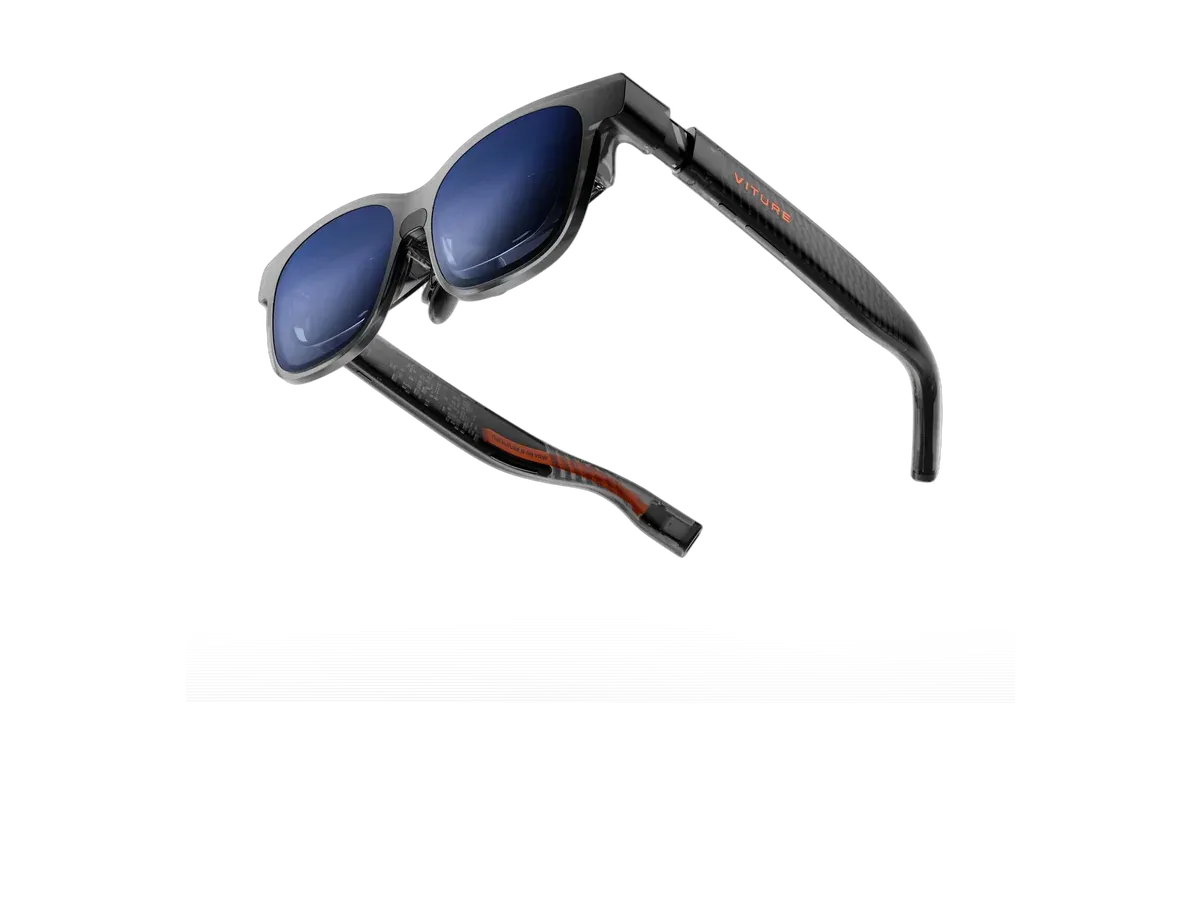
The VITURE Luma XR is the base model of VITURE's next-generation Luma series, replacing the original VITURE One lineup. It features a 1200p (1920x1200) per eye Micro-OLED display at 120Hz across a 50-degree field of view, projecting a 146-inch virtual screen at 4 meters. The Luma XR introduces a record-setting -6.0D myopia adjustment range and real-time 2D-to-3D conversion -- a world first in consumer display glasses.
Our review
By AR Compare Team ·
According to the aggregated consensus of reviewers and owners, the Luma series is the first lineup to make XREAL genuinely nervous, and the base Luma XR is its value sweet spot. At $399 it delivers the same 1200p Sony panels and 1,000-nit brightness philosophy that earned the pricier Luma Pro rave reviews, plus the lineup's widest built-in myopia range at -6.0D and its most forgiving eyebox. The recurring trade-offs in the crowdsourced record: everything smart lives in the SpaceWalker app rather than on the glasses, the speakers are weak, console docks cost extra, and some owners hit fit or durability issues. For nearsighted buyers especially, the crowd says this is the best sub-$400 pick in display glasses.
- Display quality
- 8.5/10
- Comfort
- 8/10
- Battery life
- 5.5/10
- Value for money
- 8.5/10
- Build quality
- 7/10
- Software
- 7/10
The VITURE Luma XR is the entry point to VITURE’s Luma generation, the lineup that reviewers across Tom’s Guide, Android Central, and Android Authority credit with producing the first compelling alternative to XREAL’s One Series. This review aggregates professional reviews of the Luma line, VITURE’s published specifications for the base model, and owner feedback from retailer reviews and the r/Viture community. AR Compare has not performed hands-on testing of this device; all observations are attributed to the cited sources, and scores are an editorial aggregate of cited reviewer and owner sentiment. Note that most in-depth professional coverage centers on the closely related Luma Pro; where a claim is Pro-specific, that is flagged.
How This Review Was Compiled
Dedicated standalone reviews of the $399 base Luma are scarce — outlets concentrated on the $499 Luma Pro, which shares the display architecture. This review uses those Luma-series reviews (Tom’s Guide, AndroidGuys, Android Authority), VITURE’s own model-comparison documentation for base-model deltas, Best Buy owner reviews, and community sentiment. Differences between the base Luma and Pro: a 146-inch/50-degree virtual screen versus 152-inch/52-degree, a -6.0D myopia range versus the Pro’s -4.0D, no adjustable temple angle, and $100 less.
Display: The Series’ Calling Card
The Luma generation’s 1920x1200-per-eye Sony Micro-OLED panels at 1,000 nits are the core of its critical success. Tom’s Guide called the Luma Pro “another sizable step forward in image quality at this price,” with impressive clarity and mesmerizing color, and reviewers repeatedly note details stay razor sharp even at the far edges without color fringing — historically the birdbath category’s weak point. Compared head-to-head with XREAL, Android Central’s assessment is that VITURE’s panels are brighter, while XREAL’s darker electrochromic film makes its image easier to see in harsh ambient light despite the lower nit count.
Two Luma-series advantages matter for specific buyers. First, flicker sensitivity: the Luma line uses DC dimming across its entire brightness range, where XREAL mixes in PWM — reviewers explicitly steer flicker-sensitive users to VITURE. Second, the base Luma has the largest eyebox in the lineup; VITURE’s own guidance recommends it to anyone who struggled to find the sweet spot on earlier VITURE models.
The Signature Feature: Built-In Myopia Adjustment
VITURE’s diopter dials remain its clearest differentiator over XREAL, and the base Luma XR covers 0 to -6.0D — notably wider than the Luma Pro’s -4.0D. Nearsighted owners consistently cite this as the reason they chose VITURE: no prescription inserts to order, no swapping, and the glasses can be shared across household members with different eyes. AndroidGuys’ bottom line on the Luma Pro applies doubly here: buy it if you are a nearsighted gamer or media lover who craves a portable ultra-bright screen.
Pain Points Owners Report
Software dependence. There is no onboard spatial chip. Basic mirroring works everywhere, but 3DoF anchoring, ultrawide, and multi-screen features route through the SpaceWalker app, and reviewers note VITURE’s native tracking is newer and less reliable than XREAL’s — Android Central describes needing to leave the glasses undisturbed about 10 seconds after plugging in for sensor calibration.
Audio. Despite HARMAN-tuned branding, owner and reviewer consensus is that the speakers are tinny and effectively unusable in noisy environments; plan on earbuds.
Accessory economics. Console play (Switch 2, PS5, anything HDMI) requires VITURE’s dock, roughly $129-$160 depending on bundle, which Best Buy owners argue should be included or cheaper.
Durability and fit. One Best Buy owner reports the plastic arms are prone to cracking and had to return a first pair. And the category-wide fit lottery applies: some users, even after all adjustments, cannot align both eyes in the sweet spot, leaving corners cut off — while for others the fit is perfect. Reviewers advise buying from retailers with easy returns.
Value
At $399 the base Luma undercuts the XREAL 1S by $50 and the One by $100 while matching their 1200p resolution and offering built-in prescription correction the XREALs lack entirely. The aggregate calculus: XREAL still wins for on-device smarts and Switch-adjacent maturity; the Luma XR wins for nearsighted users, flicker-sensitive users, brightness, and price. One reviewer of the pricier Luma Ultra argued most buyers should choose a simpler Luma and spend the savings on accessories — an indirect endorsement of exactly this model.
Who Should Buy the VITURE Luma XR
Per the aggregated consensus: nearsighted buyers (up to -6.0D) who want display glasses that work the moment they go on, value-focused travelers and streamers, and flicker-sensitive users. Who should skip: audio purists who will not use earbuds, console-first gamers unwilling to buy the dock, and anyone who wants anchoring and ultrawide modes that work standalone without a companion app — that buyer belongs with the XREAL 1S.
Scores are aggregates of the cited reviews and owner feedback, not AR Compare hands-on results.
Sources
- Tom’s Guide — Viture Luma Pro review: Another step forward for AR glasses
- Android Central — Xreal 1S vs Viture Beast hands-on (Luma-series vs XREAL context)
- AndroidGuys — VITURE Luma Pro Review: Bright, Risky XR Glasses Experience
- VITURE — Ultimate Guide to Choosing Your VITURE Glasses: Luma Pro, Luma Ultra, Luma, and the Beast
- VITURE — Luma XR Glasses official product page
- Best Buy — VITURE Luma Pro customer reviews (owner-reported durability and accessory feedback)
Pros & cons
Pros
- Industry-leading -6.0D myopia adjustment eliminates prescription inserts for most users
- Real-time 2D-to-3D conversion -- world first in consumer display glasses
- Electrochromic dimming blocks up to 99.5% of external light
- 1200p per eye with 108% sRGB and 100,000:1 contrast
- 120Hz refresh rate for smooth gaming and video
- 1920x1200 Sony Micro-OLED panels at 1,000 nits; reviewers call the Luma-series image razor sharp to the edges
- Largest eyebox of the Luma series, making the optical sweet spot easiest to find
- DC dimming across the brightness range, a real advantage for flicker-sensitive users
- At $399 it undercuts the XREAL One and 1S while matching resolution
Cons
- 1000 nits lower than VITURE Pro XR's 4000-nit peak brightness
- 50-degree FOV narrower than some competitors like XREAL One Pro (57 deg)
- No HDR10 support unlike RayNeo Air 4 Pro
- 146-inch virtual screen smaller than 201-inch class competitors
- Tethered via USB-C with no standalone capability
- No onboard processing chip; 3DoF anchoring and multi-screen features depend on the SpaceWalker app
- Owners describe the built-in audio as tinny and weak in noisy environments
- Console use (Switch 2, PS5) requires a separately sold dock that owners feel should be cheaper or included
- Some owners report cracking in the plastic arms, raising durability questions
- Fit remains a lottery: a minority of users never find a position where the full screen is sharp
Full specifications
Specs last verified
| Display | |
|---|---|
| Display type | Sony Micro-OLED (enhanced panels, 50% sharper than VITURE Pro) |
| Resolution | 1920x1200 |
| Field of view (°) | 50 |
| Refresh rate (Hz) | 120 |
| Brightness (nits) | 1000 |
| Virtual screen size (in) | 146 |
| HDR support | ✕ No |
| Color support | Full color |
| Not published: Pixels per degree | |
| Optics | |
| Optics type | birdbath |
| Dimming control | ✓ Yes |
| Transparency level | electrochromic film (0.5-40% transmittance) |
| Prescription support | ✓ Yes |
| Prescription options | Built-in dials, -6.00 to 0.00 · Inserts / lens frame, -16.00 to +12.00, cyl up to 6.00 |
| Physical | |
| Weight (g) | 77 |
| Frame style | wraparound |
| Color options | Translucent Black |
| Foldable | ✓ Yes |
| Not published: IP rating | |
| Battery & power | |
| Charging method | USB-C (powered by connected device) |
| Not published: Battery life, Charging time | |
| Connectivity | |
| Connectivity | USB-C |
| Tethered | ✓ Yes |
| Compatible devices | Android, iOS, PC, Mac, Steam Deck, Nintendo Switch, PlayStation, Xbox, ROG Ally |
| Computing | |
| Processing type | tethered |
| Operating system | iPhone, Android, Mac, PC, Steam Deck, Switch/Switch 2 (via adapters) |
| Chipset | None on-device (host-powered; SpaceWalker app ecosystem) |
| Sensors & input | |
| Camera | ✕ No |
| Microphones | 2 |
| Speakers | directional · spatial audio |
| Tracking | 3DoF |
| Not published: Gesture control, Voice control | |
Prescription options
The documented prescription routes for the VITURE Luma XR, from the maker and named-partner documentation recorded in our database.
- Built-in dials, -6.00 to 0.00 Source: shop.viture.com documentation
- Inserts / lens frame, -16.00 to +12.00, cyl up to 6.00 Source: viture.com documentation
Maker documentation as recorded 2026-09-17. Ranges are the maker's published limits, not medical advice — confirm your exact prescription with your optician before ordering.
Read the VITURE prescription guide for every documented option, model by model.
Where to buy
Price verified
VITURE Luma XR specs: quick answers
- What is the VITURE Luma XR's field of view?
- The VITURE Luma XR has a 50-degree field of view.
- What is the VITURE Luma XR's display resolution?
- The VITURE Luma XR's recorded per-eye display resolution is 1920x1200.
- How bright is the VITURE Luma XR's display?
- The VITURE Luma XR has a rated peak brightness of 1000 nits.
- How much does the VITURE Luma XR weigh?
- The VITURE Luma XR's glasses weigh 77g according to the manufacturer specification.
- How much does the VITURE Luma XR cost?
- The VITURE Luma XR costs $399.
VITURE Luma XR: FAQs
How much does the VITURE Luma XR cost?
The VITURE Luma XR costs $399 (USD). It is available from 2 retailers listed on this page.
What field of view does the VITURE Luma XR have?
The VITURE Luma XR has a recorded field of view of 50 degrees.
How much does the VITURE Luma XR weigh?
The VITURE Luma XR weighs 77g according to the manufacturer specification.
Can I use the VITURE Luma XR with prescription lenses?
Yes, the VITURE Luma XR supports prescription lenses. The recorded diopter range is 0.00 to -6.00.
What devices work with the VITURE Luma XR?
The VITURE Luma XR lists compatibility with: Android, iOS, PC, Mac, Steam Deck, Nintendo Switch, PlayStation, Xbox.
What resolution does the VITURE Luma XR have?
The VITURE Luma XR has a recorded per-eye resolution of 1920x1200. It refreshes at 120Hz.
Are the VITURE Luma XR good for gaming?
The VITURE Luma XR runs at a recorded 120Hz refresh rate with a 50-degree field of view -- the display specs that matter most for gaming. It is tethered, drawing video from a connected phone, PC, or console rather than running games on its own.
Is the VITURE Luma XR worth it?
The VITURE Luma XR is priced at $399 (USD). For that you get a 50-degree field of view, 1000 nits of brightness, and a 1920x1200 per-eye resolution. It weighs 77g. It is tethered, so it needs a connected phone, PC, or console to run rather than working on its own. The full spec breakdown on this page shows what the price includes.
Similar products
What shoppers cross-check with the VITURE Luma XR — from our navigation records and closest spec matches.
Ranked in these buying guides
Where the VITURE Luma XR lands in our recorded-spec rankings.
- Best AR Glasses for Gaming
- Best AR Glasses for Steam Deck
- Best AR Glasses for Movies & Travel
- Best AR Glasses for Productivity & Multi-Monitor Work
- Best AR Glasses for iPhone Users
- Prescription Smart Glasses
- The Best Smart Glasses of 2026
- Smart Glasses With a Display
- Lightest Smart Glasses
- Monitor Glasses: AR Glasses That Replace a Screen
- Best AR Glasses for Mac & MacBook
- Best AR Glasses for PC & Windows
- Best AR Glasses for Android Phones & Samsung DeX
- Best AR Glasses for Nintendo Switch
- Best AR Glasses for PS5
- Best AR Glasses for Xbox Series X & S
- Best AR Glasses for ROG Ally & Ally X
- Widest FOV AR Glasses
- Brightest Smart Glasses
Related Comparisons
VITURE Luma XR vs XREAL One Pro
VITURE vs XREAL
VITURE Luma XR vs Rokid Max 2
VITURE vs Rokid
VITURE Luma XR vs RayNeo Air 4 Pro
VITURE vs RayNeo
VITURE Luma XR vs XREAL One
VITURE vs XREAL
VITURE Luma XR vs VITURE Pro XR
VITURE
VITURE Luma XR vs XREAL 1S
VITURE vs XREAL
VITURE Luma XR vs Lenovo Legion Glasses 2
VITURE vs Lenovo
VITURE Luma XR vs Meta Ray-Ban Display
VITURE vs Meta
VITURE Luma XR vs VITURE One Lite
VITURE
VITURE Luma XR vs RayNeo Air 3s
VITURE vs RayNeo
VITURE Luma XR vs INAIR 2 Pro
VITURE vs INAIR
VITURE Luma XR vs ASUS ROG XREAL R1
VITURE vs ASUS
VITURE Luma XR vs VITURE Luma Pro
VITURE
VITURE Luma XR vs VITURE Beast XR Glasses
VITURE
VITURE Luma XR vs ASUS AirVision M1
VITURE vs ASUS
VITURE Luma XR vs Dream Glass Flow
VITURE vs Dreamworld
VITURE Luma XR vs GOOVIS G3 Max 3D Head Mounted Display
VITURE vs Goovis
VITURE Luma XR vs RayNeo Air 2
VITURE vs RayNeo
VITURE Luma XR vs RayNeo Air 3s Pro AR/XR Glasses
VITURE vs RayNeo
VITURE Luma XR vs RayNeo GT Max
VITURE vs RayNeo
VITURE Luma XR vs RayNeo GT
VITURE vs RayNeo
VITURE Luma XR vs Rokid Max
VITURE vs Rokid
VITURE Luma XR vs Rokid Station 2 Spatial Computing Host
VITURE vs Rokid
VITURE Luma XR vs Shadow Creator Honghu MR
VITURE vs Shadow Creator
VITURE Luma XR vs TCL NXTWEAR S+ AR Glasses
VITURE vs TCL
VITURE Luma XR vs TCL NxtWear S
VITURE vs TCL
VITURE Luma XR vs VITURE Luma Ultra XR/AR Glasses
VITURE
VITURE Luma XR vs VITURE One XR Glasses
VITURE
VITURE Luma XR vs VITURE Pro 2 XR Glasses
VITURE
VITURE Luma XR vs XREAL Air 2
VITURE vs XREAL
VITURE Luma XR vs XREAL Air 2 Pro
VITURE vs XREAL
VITURE Luma XR vs XREAL Air 2 Ultra
VITURE vs XREAL
VITURE Luma XR vs XREAL Beam
VITURE vs XREAL
VITURE Luma XR vs XREAL xbx a01+
VITURE vs XREAL