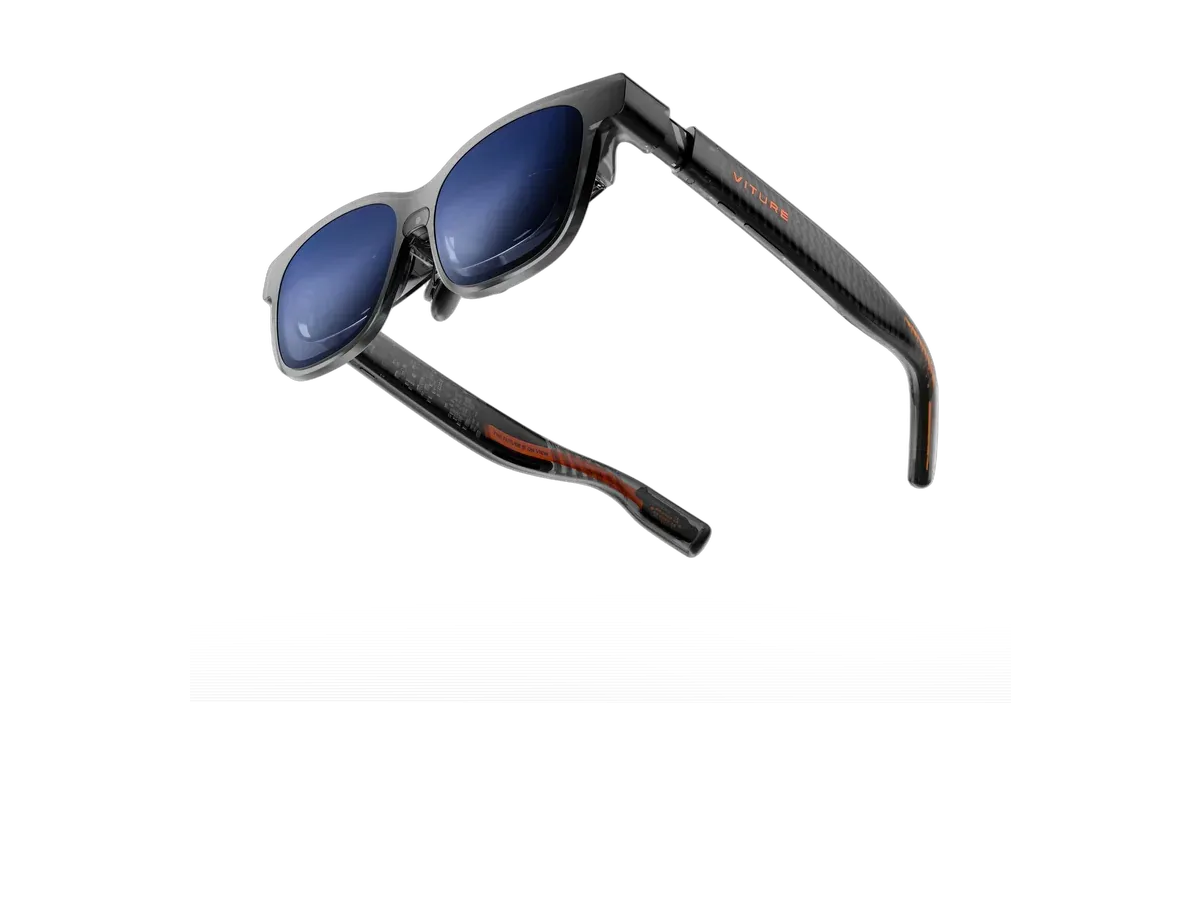
At a glance
- Display type
- Sony Micro-OLED (50% sharper than VITURE Pro)
- Resolution
- 1920x1200
- Field of view
- 52°
- Refresh rate
- 120 Hz
- Brightness
- 1000 nits
- Weight
- 79 g
- Class-leading image quality at $499 — an Editor's Choice pick in major-outlet testing
- 1200p, 1000 nits, 52° FOV with 120Hz
- Speakers on the quiet side
- Some advertised features arrived post-launch via firmware
VITURE Luma Pro
VITURE
8.3/10 “According to the aggregated consensus of reviewers and owners, the VITURE Luma Pro is the best-reviewed pair of display glasses under $500 right now. Tom's Guide calls it a sizable step forward in image quality at this price and concludes that if you want the most comfortable AR glasses with the best picture, the Luma Pro is the way to go; Android Authority frames it plainly as the best XR glasses for under $500. The recurring strengths are the 1200p Sony panels at a recorded 1,000 nits, the magnetically modular and genuinely comfortable fit, and built-in myopia correction that XREAL still lacks. The recurring trade-offs: the onboard diopter range narrowed to -4.0D, the speakers are weak, ultrawide and 6DoF arrived after launch, and everything smart depends on the SpaceWalker app rather than an onboard chip. Scores below are an editorial aggregate of that cited coverage, not AR Compare hands-on measurements.” Read the full review$499
Check price at Amazon- Field of view
- 52°
- Weight
- 79 g
- Brightness
- 1000 nits
The VITURE Luma Pro are display glasses for media, gaming, and productivity from VITURE, released 2025-07. They feature a 1920x1200 per-eye Sony Micro-OLED (50% sharper than VITURE Pro), 52° field of view, 1000 nits perceived brightness, 120Hz refresh rate. Weight is 79g. Best for: All-around pick of the Luma family — media, travel and productivity with iPhone/Mac/handhelds.
Our review
By AR Compare Team ·
According to the aggregated consensus of reviewers and owners, the VITURE Luma Pro is the best-reviewed pair of display glasses under $500 right now. Tom's Guide calls it a sizable step forward in image quality at this price and concludes that if you want the most comfortable AR glasses with the best picture, the Luma Pro is the way to go; Android Authority frames it plainly as the best XR glasses for under $500. The recurring strengths are the 1200p Sony panels at a recorded 1,000 nits, the magnetically modular and genuinely comfortable fit, and built-in myopia correction that XREAL still lacks. The recurring trade-offs: the onboard diopter range narrowed to -4.0D, the speakers are weak, ultrawide and 6DoF arrived after launch, and everything smart depends on the SpaceWalker app rather than an onboard chip. Scores below are an editorial aggregate of that cited coverage, not AR Compare hands-on measurements.
- Display quality
- 9/10
- Comfort
- 8.5/10
- Battery life
- 5.5/10
- Value for money
- 8/10
- Build quality
- 8/10
- Software
- 7/10
The VITURE Luma Pro is the flagship of VITURE’s Luma generation, the lineup that reviewers across Tom’s Guide, Android Authority, and AndroidGuys credit with producing the first genuinely compelling challenge to XREAL’s One Series. This review aggregates that professional coverage, CK Tech Check’s long-term switcher’s review, VITURE’s published specifications, and owner feedback from retailer reviews. AR Compare has not performed hands-on testing of this device; every observation below is attributed to the cited sources, and the category scores are an editorial aggregate of cited reviewer and owner sentiment. Product facts were cross-checked against AR Compare’s own spec record for the Luma Pro (dual Sony Micro-OLED at 1920x1200 per eye, a recorded 52-degree field of view, 1,000 nits, 120Hz, roughly 79 grams, $499).
How This Review Was Compiled
Sources include Tom’s Guide’s full review, Android Authority’s review (which names it the best XR glasses under $500), AndroidGuys’ long-form writeup, Best Buy owner reviews for durability and accessory feedback, and VITURE’s own specification page. A September 2026 re-check of the record added CK Tech Check’s review — notable because its writer bought the Luma Pro to replace a failed XREAL pair, so it reads as a switcher’s long-term account rather than a launch impression — and refreshed the Best Buy owner figures. Where reviewers disagree, the range is reported rather than a single figure, and the one genuine split in the record — long-term durability — is reported as a split below.
Display: The Reason the Reviews Are This Good
The Luma Pro’s 1920x1200-per-eye Sony Micro-OLED panels are the core of its critical reception. Tom’s Guide described the result as a simply stunning picture and, in its bottom line, called the Luma Pro a sizable step forward in image quality at this price, praising clarity and color. Reviewers consistently note that the panels stay sharp toward the edges and that the recorded 1,000-nit brightness is high enough that owners often run it below maximum. The 120Hz refresh rate is repeatedly cited as adding smoothness for gaming and fast motion, and the recorded 52-degree, 152-inch virtual screen is framed as a meaningful step up from earlier VITURE optics.
The signature differentiator over XREAL remains vision correction: the Luma Pro pairs electrochromic film lenses with built-in myopia adjustment, so nearsighted buyers get a sharp image with no prescription inserts to order or swap. The consistent caveat reviewers flag is that the Pro’s onboard dial covers up to -4.0D — narrower than the base Luma XR’s -6.0D and less than some earlier VITURE models — so buyers past -4.0D are steered toward the cheaper base Luma or toward inserts.
Comfort and Build
Comfort is a consensus strength. Reviewers describe magnetically attached nose pads, arms that snap into different angles, and soft-touch plastic over the ears, adding up to a fit called comfortable across a full workday and even a long-haul flight. At roughly 79 grams the Luma Pro is light enough for extended wear, and the modular, swappable pads let it fit a range of faces. Android Authority’s summary is that these are comfortable, highly adjustable glasses with wide media support and crystal-clear display tech, making them an easy recommendation. CK Tech Check pushes the comfort claim further than most, reporting the glasses stayed put at a jogging pace on a treadmill without squeezing the head, and framing the whole product as an ergonomic aid that happens to be a high-end display.
Long-term durability is where the record genuinely splits. On one side, CK Tech Check — whose original XREAL Airs failed at the hinges after roughly 3 years — credits the Luma Pro’s reinforced hinges and its magnetic breakaway connector, a pogo-pin cable that pops off when snagged instead of stressing the frame the way a fixed USB-C port does, and judges it built for daily wear. On the other, a small minority of Best Buy owners report the opposite experience: the sharpest one-star review describes repeated cracking at the temple hinges across multiple replacement pairs, and another reports a unit whose display cut out after a week. The bulk of owner ratings do not echo this — build-quality themes in the owner record skew positive — but the dissent exists and is reported here rather than smoothed over. The breakaway connector itself draws its own minor complaint: CK Tech Check notes the side-mounted plug can stick out past the ear, where XREAL’s rear-exit cable was stealthier.
Pain Points Owners and Reviewers Report
Audio. Despite HARMAN-tuned branding, the aggregated verdict is that the speakers are too quiet for anywhere outside a quiet room; Android Authority found them weak and recommended earbuds instead. Plan on separate audio.
Software dependence and post-launch features. There is no onboard processing chip. Basic mirroring works anywhere, but 3DoF anchoring, ultrawide, and multi-screen modes route through VITURE’s SpaceWalker app and the host device. Reviewers also noted that ultrawide simulation and 6DoF support were promised as post-launch software rather than shipping in the box at review time — a real consideration for buyers who want those modes on day one. The Android version of SpaceWalker draws the sharpest criticism in the newer coverage: CK Tech Check found its sandboxed environment blocks the native YouTube and Netflix apps, forces video through its own browser, and would not keep logins persistent, and ended up bypassing SpaceWalker entirely on phones in favor of Samsung DeX — while praising the same software on a laptop for genuinely useful triple-virtual-monitor work.
Desktop compatibility. The Luma Pro is, electrically, a USB-C monitor, and CK Tech Check’s blunt warning is that this is where the plug-and-play dream dies for desktop owners: most desktop graphics cards have no USB-C port at all, and its writer spent weeks troubleshooting adapters before getting a desktop signal working. Phones, Macs, handhelds, and most modern laptops with DisplayPort-over-USB-C work immediately; desktop-tower buyers should verify their GPU’s outputs first. There is one quiet upside in the same account: on a Samsung S24 Ultra, 20 minutes of video drained roughly 8 percent of the phone’s battery through the Luma Pro against roughly 15 percent through the older XREAL pair — a lighter draw on the host than the category’s reputation suggests.
Not a mandatory upgrade. Multiple reviewers explicitly told existing VITURE Pro owners that the Luma Pro, while excellent, is not a necessary upgrade — a useful honesty signal for anyone weighing a within-brand jump.
Where the Luma Pro Sits in the Luma Family
The most common buyer question in the record is not whether to buy VITURE but which VITURE, and the family ladder in AR Compare’s spec records makes the trade-offs concrete. One step down, the Luma XR at $399 keeps the Sony Micro-OLED panel philosophy and stretches the myopia dials to -6.0D, but drops to a 50-degree view — the pick for stronger prescriptions and tighter budgets. One step up, the Luma Ultra at $599 adds tracking cameras, hand tracking, and true 6DoF anchoring on an otherwise shared design, aimed at spatial-computing buyers rather than movie watchers. Off to the side, the VITURE Beast at $549 trades the Luma Pro’s glasses-first lightness for a wider 58-degree view in a heavier 88-gram frame with flat prism optics. The aggregated advice reads consistently: the Luma Pro is the balanced middle of the family — the best-reviewed picture per dollar for media and travel — while each sibling exists for a sharper-edged need the Pro deliberately does not chase.
Value
At $499 the Luma Pro sits directly against the XREAL One, and the aggregate calculus favors it for a specific buyer. Android Authority’s framing — the best XR glasses for under $500 — captures the majority view, and the owner record backs it with numbers: as of a September 2026 check, Best Buy owners rate the Luma Pro 4.3 out of 5 across 66 reviews, with 85 percent saying they would recommend it and display quality the most-praised theme by a wide margin. Two honesty notes attach to that figure: many of the posted reviews disclose promotional consideration or sweepstakes entry, and the small one-star tail is where the hinge-durability dissent above lives. The counterweight is that the base Luma XR delivers the same panel philosophy for $100 less with a wider diopter range, so value-first buyers who do not need the Pro’s larger screen and adjustable temples are often pointed one model down. Scores here are aggregates of the cited reviews and owner reports, not AR Compare hands-on measurements.
Who Should Buy the VITURE Luma Pro
Per the aggregated consensus: buyers who want the best picture quality and most comfortable fit in sub-$500 display glasses, nearsighted users up to -4.0D who value zero-insert vision correction, and media-and-gaming users who want a bright 120Hz screen that works the moment it goes on. Who should skip: anyone past -4.0D of myopia (the base Luma XR reaches -6.0D), audio purists unwilling to use earbuds, existing VITURE Pro owners who were told the upgrade is optional, and buyers who need onboard anchoring and ultrawide modes that work without a companion app.
Scores are aggregates of the cited reviews and owner feedback, not AR Compare hands-on results.
Sources
- Tom’s Guide — Viture Luma Pro review: Another step forward for AR glasses
- Android Authority — VITURE Luma Pro review: The best XR glasses for under $500
- AndroidGuys — VITURE Luma Pro Review: Bright, Risky XR Glasses Experience
- CK Tech Check — VITURE Luma Pro Review: The XREAL Upgrade I Switched To
- Best Buy — VITURE Luma Pro XR Glasses customer reviews (owner-reported comfort, durability, accessories)
- VITURE — Luma Pro XR Glasses official product page (specifications)
Pros & cons
Pros
- Class-leading image quality at $499 — an Editor's Choice pick in major-outlet testing
- 1200p, 1000 nits, 52° FOV with 120Hz
- Front RGB camera and RGB frame lighting
- Myopia dials plus tilt-adjustable arms
- Magnetically attached nose pads and angle-adjustable arms that testers describe as comfortable across a full workday or a long-haul flight
- Built-in myopia adjustment plus electrochromic film, so nearsighted users get a sharp screen with no prescription inserts
- 120Hz refresh on a recorded 52-degree, 152-inch virtual screen that reviewers say holds up for both media and gaming
Cons
- Speakers on the quiet side
- Some advertised features arrived post-launch via firmware
- No native tracking chip — anchoring depends on host SpaceWalker software
- The onboard myopia range tops out at -4.0D, narrower than the base Luma's -6.0D and earlier VITURE generations
- Ultrawide simulation and 6DoF were promised via post-launch software rather than shipping in the box
- Existing VITURE Pro owners are told the upgrade is not essential
Full specifications
Specs last verified
| Display | |
|---|---|
| Display type | Sony Micro-OLED (50% sharper than VITURE Pro) |
| Resolution | 1920x1200 |
| Field of view (°) | 52 |
| Refresh rate (Hz) | 120 |
| Brightness (nits) | 1000 |
| Virtual screen size (in) | 152 |
| Color support | Full color |
| Not published: Pixels per degree, HDR support | |
| Optics | |
| Optics type | birdbath |
| Dimming control | ✓ Yes |
| Prescription support | ✓ Yes |
| Prescription options | Built-in dials, -4.00 to 0.00 · Inserts / lens frame, -16.00 to +12.00, cyl up to 6.00 |
| Not published: Transparency level | |
| Physical | |
| Weight (g) | 79 |
| Frame style | glasses |
| Foldable | ✕ No |
| Not published: Color options, IP rating | |
| Connectivity | |
| Connectivity | USB-C (DP Alt Mode) |
| Tethered | ✓ Yes |
| Compatible devices | Android, iOS, PC, Mac, Steam Deck, Nintendo Switch 2, PlayStation, Xbox, ROG Ally, Lenovo Legion Go, iPad |
| Computing | |
| Processing type | tethered |
| Operating system | iPhone, Android, Mac, PC, Steam Deck, Switch/Switch 2 |
| Chipset | None on-device (host-powered; SpaceWalker ecosystem) |
| Sensors & input | |
| Camera | ✕ No |
| Speakers | open-ear |
| Tracking | 3DoF |
| Not published: Microphones, Gesture control, Voice control | |
Prescription options
The documented prescription routes for the VITURE Luma Pro, from the maker and named-partner documentation recorded in our database.
- Built-in dials, -4.00 to 0.00 Source: shop.viture.com documentation
- Inserts / lens frame, -16.00 to +12.00, cyl up to 6.00 Source: viture.com documentation
Maker documentation as recorded 2026-09-17. Ranges are the maker's published limits, not medical advice — confirm your exact prescription with your optician before ordering.
Read the VITURE prescription guide for every documented option, model by model.
Where to buy
Price verified
VITURE Luma Pro specs: quick answers
- What is the VITURE Luma Pro's field of view?
- The VITURE Luma Pro has a 52-degree field of view.
- What is the VITURE Luma Pro's display resolution?
- The VITURE Luma Pro's recorded per-eye display resolution is 1920x1200.
- How bright is the VITURE Luma Pro's display?
- The VITURE Luma Pro has a rated peak brightness of 1000 nits.
- How much does the VITURE Luma Pro weigh?
- The VITURE Luma Pro's glasses weigh 79g according to the manufacturer specification.
- How much does the VITURE Luma Pro cost?
- The VITURE Luma Pro costs $499.
VITURE Luma Pro: FAQs
How much does the VITURE Luma Pro cost?
The VITURE Luma Pro costs $499 (USD). It is available from 2 retailers listed on this page.
What field of view does the VITURE Luma Pro have?
The VITURE Luma Pro has a recorded field of view of 52 degrees.
How much does the VITURE Luma Pro weigh?
The VITURE Luma Pro weighs 79g according to the manufacturer specification.
Can I use the VITURE Luma Pro with prescription lenses?
Yes, the VITURE Luma Pro supports prescription lenses. The recorded diopter range is Built-in myopia adjustment up to -4.0D; clip-on Rx frame for astigmatism/hyperopia (SPH -16 to +12, CYL 6).
What devices work with the VITURE Luma Pro?
The VITURE Luma Pro lists compatibility with: Android, iOS, PC, Mac, Steam Deck, Nintendo Switch 2, PlayStation, Xbox.
What resolution does the VITURE Luma Pro have?
The VITURE Luma Pro has a recorded per-eye resolution of 1920x1200. It refreshes at 120Hz.
Are the VITURE Luma Pro good for gaming?
The VITURE Luma Pro runs at a recorded 120Hz refresh rate with a 52-degree field of view -- the display specs that matter most for gaming. It is tethered, drawing video from a connected phone, PC, or console rather than running games on its own.
Is the VITURE Luma Pro worth it?
The VITURE Luma Pro is priced at $499 (USD). For that you get a 52-degree field of view, 1000 nits of brightness, and a 1920x1200 per-eye resolution. It weighs 79g. It is tethered, so it needs a connected phone, PC, or console to run rather than working on its own. The full spec breakdown on this page shows what the price includes.
Similar products
What shoppers cross-check with the VITURE Luma Pro — from our navigation records and closest spec matches.
Ranked in these buying guides
Where the VITURE Luma Pro lands in our recorded-spec rankings.
- Best AR Glasses for Gaming
- Best AR Glasses for Steam Deck
- Best AR Glasses for Movies & Travel
- Best AR Glasses for Productivity & Multi-Monitor Work
- Best AR Glasses for iPhone Users
- Prescription Smart Glasses
- The Best Smart Glasses of 2026
- Smart Glasses With a Display
- Lightest Smart Glasses
- Best AR Glasses for Nintendo Switch 2
- Monitor Glasses: AR Glasses That Replace a Screen
- Best AR Glasses for Mac & MacBook
- Best AR Glasses for PC & Windows
- Best AR Glasses for Android Phones & Samsung DeX
- Best AR Glasses for PS5
- Best AR Glasses for Xbox Series X & S
- Best AR Glasses for ROG Ally & Ally X
- Best AR Glasses for Lenovo Legion Go
- Widest FOV AR Glasses
- Brightest Smart Glasses
Related Comparisons
VITURE Luma Pro vs XREAL One
VITURE vs XREAL
VITURE Luma Pro vs VITURE Luma Ultra XR/AR Glasses
VITURE
VITURE Luma Pro vs XREAL One Pro
VITURE vs XREAL
VITURE Luma Pro vs VITURE Pro XR
VITURE
VITURE Luma Pro vs VITURE Beast XR Glasses
VITURE
VITURE Luma Pro vs VITURE Luma XR
VITURE
VITURE Luma Pro vs RayNeo Air 4 Pro
VITURE vs RayNeo
VITURE Luma Pro vs XREAL 1S
VITURE vs XREAL
VITURE Luma Pro vs Rokid Max 2
VITURE vs Rokid
VITURE Luma Pro vs ASUS AirVision M1
VITURE vs ASUS
VITURE Luma Pro vs ASUS ROG XREAL R1
VITURE vs ASUS
VITURE Luma Pro vs Dream Glass Flow
VITURE vs Dreamworld
VITURE Luma Pro vs GOOVIS G3 Max 3D Head Mounted Display
VITURE vs Goovis
VITURE Luma Pro vs INAIR 2 Pro
VITURE vs INAIR
VITURE Luma Pro vs Lenovo Legion Glasses 2
VITURE vs Lenovo
VITURE Luma Pro vs RayNeo Air 2
VITURE vs RayNeo
VITURE Luma Pro vs RayNeo Air 3s Pro AR/XR Glasses
VITURE vs RayNeo
VITURE Luma Pro vs RayNeo Air 3s
VITURE vs RayNeo
VITURE Luma Pro vs RayNeo GT Max
VITURE vs RayNeo
VITURE Luma Pro vs RayNeo GT
VITURE vs RayNeo
VITURE Luma Pro vs Rokid Max
VITURE vs Rokid
VITURE Luma Pro vs Rokid Station 2 Spatial Computing Host
VITURE vs Rokid
VITURE Luma Pro vs Shadow Creator Honghu MR
VITURE vs Shadow Creator
VITURE Luma Pro vs TCL NXTWEAR S+ AR Glasses
VITURE vs TCL
VITURE Luma Pro vs TCL NxtWear S
VITURE vs TCL
VITURE Luma Pro vs VITURE One XR Glasses
VITURE
VITURE Luma Pro vs VITURE One Lite
VITURE
VITURE Luma Pro vs VITURE Pro 2 XR Glasses
VITURE
VITURE Luma Pro vs XREAL Air 2
VITURE vs XREAL
VITURE Luma Pro vs XREAL Air 2 Pro
VITURE vs XREAL
VITURE Luma Pro vs XREAL Air 2 Ultra
VITURE vs XREAL
VITURE Luma Pro vs XREAL Beam
VITURE vs XREAL
VITURE Luma Pro vs XREAL xbx a01+
VITURE vs XREAL