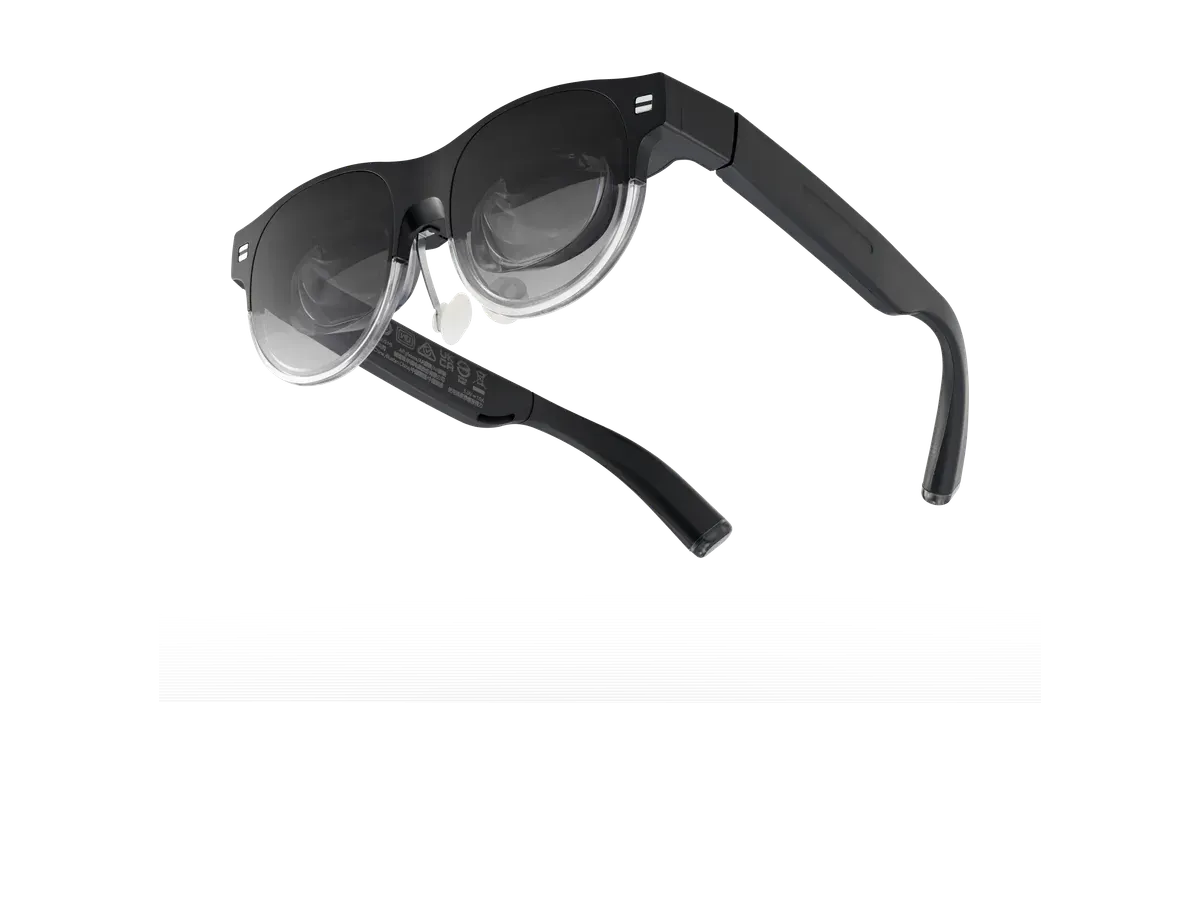
At a glance
- Display type
- Micro-OLED
- Resolution
- 1920x1080
- Field of view
- 38°
- Refresh rate
- 72 Hz
- Brightness
- 1100 nits
- Weight
- 87 g
- 95% DCI-P3 color gamut for accurate, vibrant colors
- Multi-screen support via AirVision App -- multiple virtual monitors simultaneously
- 38-degree FOV is narrower than XREAL One Pro (57), Rokid Max 2 (50), and most competitors
- 72Hz refresh rate is below the 120Hz standard in the display glasses category
ASUS AirVision M1
ASUS
5.5/10 “According to the aggregated consensus of reviewers, the ASUS AirVision M1 is a panned first effort whose story has become its price. At the $699 launch price, Tom's Hardware called it an expensive and shaky first effort with focus issues and subpar materials, and Windows Central judged the pricing utterly unfeasible against cheaper, better-equipped XREAL rivals -- while smaller regional outlets were kinder, with Gadgets Middle East scoring it 8/10. The recorded hardware explains the spread: accurate micro-OLED color and unusually clear see-through optics, but a narrow 38-degree view, app-gated 72Hz refresh, and flat speakers. A 2026 retrospective reports European street prices near half of launch, where the value math finally softens. Scores below are an editorial aggregate of that cited coverage, not AR Compare hands-on measurements.” Read the full review$699
Check price at Amazon- Field of view
- 38°
- Weight
- 87 g
- Brightness
- 1100 nits
The ASUS AirVision M1 is a wearable display glasses featuring dual 1080p Micro-OLED displays with 1,100-nit brightness, 95% DCI-P3 color gamut, 72Hz refresh rate, and multi-screen support via the AirVision App -- connecting via USB-C to PCs, gaming handhelds, phones, and tablets in an 87-gram glasses form factor with a magnetic shade and prescription lens support.
Our review
By AR Compare Team ·
According to the aggregated consensus of reviewers, the ASUS AirVision M1 is a panned first effort whose story has become its price. At the $699 launch price, Tom's Hardware called it an expensive and shaky first effort with focus issues and subpar materials, and Windows Central judged the pricing utterly unfeasible against cheaper, better-equipped XREAL rivals -- while smaller regional outlets were kinder, with Gadgets Middle East scoring it 8/10. The recorded hardware explains the spread: accurate micro-OLED color and unusually clear see-through optics, but a narrow 38-degree view, app-gated 72Hz refresh, and flat speakers. A 2026 retrospective reports European street prices near half of launch, where the value math finally softens. Scores below are an editorial aggregate of that cited coverage, not AR Compare hands-on measurements.
- Display quality
- 5.5/10
- Comfort
- 6/10
- Battery life
- 5/10
- Value for money
- 3.5/10
- Build quality
- 5.5/10
- Software
- 6.5/10
The ASUS AirVision M1 is ASUS’s first attempt at tethered display glasses: a wearable USB-C monitor with dual 1920x1080 micro-OLED panels, built to pair with Windows PCs and the ROG Ally handheld, released in January 2025 at $699. The launch reviews were unusually harsh for a major-brand debut, and the product’s 2026 story is a price that has slid well below list. This review aggregates the hands-on record: Tom’s Hardware’s review, Windows Central’s review, tech360tv’s review, Gadgets Middle East’s scored review, and OVRDOZ’s retrospective. AR Compare has not performed hands-on testing of this device; every observation below is attributed to the cited sources, and the category scores are an editorial aggregate of cited reviewer sentiment. Product facts were cross-checked against AR Compare’s spec record for the AirVision M1 (a recorded 1,100 nits, a recorded 38-degree field of view, 72Hz, roughly 87 grams, a 100-inch virtual screen, $699).
How This Review Was Compiled
The record splits cleanly by geography and depth. Tom’s Hardware’s Brandon Hill ran the fullest test across Windows handhelds and Macs, and Windows Central’s Zachary Boddy wrote the most price-focused review; both are strongly negative. tech360tv’s Mikhail Ow and Gadgets Middle East’s Joshua James reviewed it more favorably, the latter scoring 8/10. OVRDOZ’s retrospective, updated into 2026, is used here for pricing direction only: several of its spec figures disagree with both the launch reviews and the vendor record, so its numbers are treated with caution. Where the sources disagree — and on this product they disagree more than usual — both readings are reported below.
Why Did Reviewers Pan the AirVision M1 at Launch?
The citable verdict spread is unusually wide. Tom’s Hardware’s headline judgment: an expensive and shaky first effort, hard to get excited about at this price with focus issues and subpar materials, concluding the glasses feel like they should cost hundreds less. Windows Central: fine at the fundamentals but utterly unfeasible at its price, with the blunt advice to buy XREAL instead unless the price falls 40 percent or more. The specific failures recur across reviews. Tom’s Hardware hit a center-of-frame blur no amount of IPD adjustment would fix, fatiguing eyes within minutes on text — a finding Gadgets Middle East independently corroborates on non-ASUS Windows machines — and the plastic struck that reviewer as thin, hollow, and easy to scratch, more in line with budget rivals than a premium device. The kinder pole is real but limited: tech360tv praises the cinematic picture in dark rooms, and Gadgets Middle East rates it a solid pick for portable productivity while still flagging the blur, the fit, and the trailing refresh rate.
Is the AirVision M1 Worth It Now?
The price-drop reframe is the honest 2026 question, and the record supports a conditional shift. OVRDOZ’s retrospective pegs European street pricing at roughly 299 to 349 euros — near half the launch figure — and argues the glasses become an excellent budget buy at the bottom of that range while pointing shoppers elsewhere above it. That tracks exactly with the launch consensus: Windows Central wrote that the M1 would make a compelling case for itself at half the price, and Tom’s Hardware’s complaint was always the gap between build and bill. So the aggregate answer: at list price, no reviewer says buy; at a deep street discount, the calculus flips for buyers who mainly want a clear-lensed portable monitor for Windows productivity and can tolerate the focus caveat. The catalog record still carries the $699 list price, and US street pricing moves sale to sale, so check the current figure before applying the cheaper-now logic.
The Specs: Good Panels Behind a Narrow Window
The display hardware reads better on paper than through the lenses. The recorded 1,100 nits of brightness and 95 percent DCI-P3 coverage earn consistent praise for color — Windows Central calls the panels colorful, accurate, and decently sharp — but the recorded 38-degree field of view is the narrowest among the glasses reviewers compared it to, and the 72Hz ceiling only engages with the AirVision app on Windows; Macs, phones, and app-less setups run at 60Hz, per Tom’s Hardware. The one spec reviewers genuinely celebrate is transparency: Windows Central could read small text through the lenses while wearing them like ordinary glasses, calling the roughly 60 percent optical clarity several times clearer than typical birdbath rivals, useful for staying present in a room. Comfort lands mid-pack at a recorded 87 grams — Windows Central found them comfortable and well-disguised, Gadgets Middle East warns the curved temples do not grip every head securely, and tech360tv expects an adjustment period. There is no battery: power comes over the USB-C tether, so the battery score of 5 follows this site’s category convention for tethered display glasses rather than any standalone runtime.
The Multi-Screen Software, and Its Windows Catch
The AirVision app is the closest thing the M1 has to a moat. It drives virtual multi-monitor setups — a three-screen working mode, ultrawide gaming ratios up to 48:9, an infinity canvas, and custom layouts — plus 3DoF head tracking, gesture controls, IPD adjustment, and picture modes. Windows Central rates the app lightweight, intuitive, and stable, better than XREAL’s software of the moment though behind VITURE’s ecosystem, and treats it as effectively mandatory since tracking and the on-screen display need it. The catches accumulate from there: the app is Windows-only, so every other platform loses those features; the tracking that does arrive is shaky and prone to drifting, per the same review; Tom’s Hardware saw performance warnings when running more than one virtual display; and the temple touchpad frequently misses or misreads inputs. Gadgets Middle East adds that infinity mode has limited practical use.
AirVision M1 vs XREAL One Pro
Reviewers’ alternative of choice was consistently XREAL. Windows Central prices the comparison bluntly — more capable XREAL glasses cost less while adding onboard 3DoF, electrochromic dimming, wider fields of view, and 120Hz — and Tom’s Hardware makes the same case on build quality and audio. Against the XREAL One Pro specifically, AR Compare’s record shows a recorded 57-degree field of view and self-contained tracking against the M1’s recorded 38 degrees and app-dependent tracking, with the M1’s counters being its multi-screen Windows software and clearer see-through lenses. The line-by-line breakdown sits on the AirVision M1 vs XREAL One Pro comparison.
Value
At $699 the aggregate is the most negative in this catalog: Tom’s Hardware finds it difficult to recommend at all, and Windows Central calls the pricing baffling when the category’s best falls between $300 and $500. Every kind word in the record is conditional on a discount — Windows Central names 40 percent off as the threshold where consideration begins, and the retrospective pricing suggests European retail has already crossed it. Buyers weighing the M1 are effectively buying a discount, not a product tier, and the sources agree the money at list belongs with XREAL or VITURE instead.
Who Should Buy the ASUS AirVision M1
Per the aggregated consensus: deal hunters who find it at a street price near half of list and mainly want Windows multi-monitor productivity, ROG Ally owners who value the first-party pairing, and buyers who prize unusually clear see-through lenses for staying aware of a room. Who should skip: anyone paying list price, per every major review; text-heavy workers, given the center-blur findings; Mac and phone users, who lose the app, the tracking, and the 72Hz mode; and competitive gamers, for whom reviewers say the refresh ceiling and flat speakers disqualify it.
Scores are aggregates of the cited reviews and hands-on reports, not AR Compare hands-on results.
Sources
- Tom’s Hardware — ASUS AirVision M1 AR glasses review: An expensive and shaky first effort
- Windows Central — ASUS AirVision M1 review: $700 just isn’t worth it
- tech360tv — ASUS AirVision M1 review
- Gadgets Middle East — ASUS AirVision M1 review (8/10)
- OVRDOZ — ASUS AirVision M1, one year later (retrospective)
What other reviewers say
1 review from an outside outlet.
Scores from other outlets, as published — not our rating.
| Source | Score |
|---|---|
| Gadgets Middle East | 8/10 |
Pros & cons
Pros
- 95% DCI-P3 color gamut for accurate, vibrant colors
- Multi-screen support via AirVision App -- multiple virtual monitors simultaneously
- 1,100-nit brightness is competitive for outdoor visibility
- Broad device compatibility including ROG Ally, iPhone, Mac, Android
- Prescription lens holder included in box -- ready for custom lenses
- Optical transparency reviewers could genuinely read small text through, far clearer see-through than typical birdbath rivals
- A companion app one review calls lightweight, intuitive, and stable, with working, gaming, and infinity multi-screen modes
- Ambient light and wear-detection sensors that auto-adjust brightness and blank the displays when the glasses come off
- Comfort fundamentals reviewers rate as competent: swappable nose pads, flexible stems, and software IPD adjustment
Cons
- 38-degree FOV is narrower than XREAL One Pro (57), Rokid Max 2 (50), and most competitors
- 72Hz refresh rate is below the 120Hz standard in the display glasses category
- $699 is premium pricing for specs that trail XREAL and VITURE alternatives
- No electrochromic dimming -- relies on magnetic clip-on shade
- First-generation product with early software stability concerns
- Center-of-frame blur that two separate reviews could never focus away, fatiguing eyes within minutes on text-heavy work
- The peak refresh rate only arrives with the Windows-only companion app, dropping to 60Hz on Macs, phones, and app-less setups
- Speakers reviewers call flat, hollow, and muffled in games, trailing rivals that offer tuned audio at lower prices
- Head tracking one review found shaky and prone to drifting, with a touchpad that frequently misreads inputs
- Launch reviews from the biggest outlets recommend against buying at list price, advising a discount of 40 percent or more first
Full specifications
Specs last verified
| Display | |
|---|---|
| Display type | Micro-OLED |
| Resolution | 1920x1080 |
| Field of view (°) | 38 |
| Refresh rate (Hz) | 72 |
| Brightness (nits) | 1100 |
| Virtual screen size (in) | 100 |
| HDR support | ✕ No |
| Color support | Full color |
| Not published: Pixels per degree | |
| Optics | |
| Optics type | birdbath |
| Dimming control | ✓ Yes |
| Transparency level | magnetic shade included |
| Prescription support | ✓ Yes |
| Prescription options | Inserts / lens frame |
| Physical | |
| Weight (g) | 87 |
| Frame style | glasses |
| Color options | Black |
| Foldable | ✓ Yes |
| Not published: IP rating | |
| Battery & power | |
| Charging method | USB-C (powered by host device) |
| Not published: Battery life, Charging time | |
| Connectivity | |
| Connectivity | USB-C |
| Tethered | ✓ Yes |
| Compatible devices | ROG Ally, Steam Deck, Windows PC, Mac, iPhone 15/16, Android, Tablets |
| Computing | |
| Processing type | tethered |
| Not published: Operating system, Chipset | |
| Sensors & input | |
| Camera | ✕ No |
| Microphones | 1 |
| Speakers | open-ear |
| Tracking | 3DoF |
| Not published: Gesture control, Voice control | |
Prescription options
The documented prescription routes for the ASUS AirVision M1, from the maker and named-partner documentation recorded in our database.
- Inserts / lens frame — range not published by the maker Source: asus.com documentation
Maker documentation as recorded 2026-09-17. Ranges are the maker's published limits, not medical advice — confirm your exact prescription with your optician before ordering.
Where to buy
ASUS AirVision M1 specs: quick answers
- What is the ASUS AirVision M1's field of view?
- The ASUS AirVision M1 has a 38-degree field of view.
- What is the ASUS AirVision M1's display resolution?
- The ASUS AirVision M1's recorded per-eye display resolution is 1920x1080.
- How bright is the ASUS AirVision M1's display?
- The ASUS AirVision M1 has a rated peak brightness of 1100 nits.
- How much does the ASUS AirVision M1 weigh?
- The ASUS AirVision M1's glasses weigh 87g according to the manufacturer specification.
- How much does the ASUS AirVision M1 cost?
- The ASUS AirVision M1 costs $699.
ASUS AirVision M1: FAQs
How much does the ASUS AirVision M1 cost?
The ASUS AirVision M1 costs $699 (USD). It is available from 2 retailers listed on this page.
What field of view does the ASUS AirVision M1 have?
The ASUS AirVision M1 has a recorded field of view of 38 degrees.
How much does the ASUS AirVision M1 weigh?
The ASUS AirVision M1 weighs 87g according to the manufacturer specification.
Can I use the ASUS AirVision M1 with prescription lenses?
Yes, the ASUS AirVision M1 supports prescription lenses. The recorded diopter range is Prescription lens holder in box, optician-fitted (1.6+ index recommended); no maker range published.
What devices work with the ASUS AirVision M1?
The ASUS AirVision M1 lists compatibility with: ROG Ally, Steam Deck, Windows PC, Mac, iPhone 15/16, Android, Tablets.
What resolution does the ASUS AirVision M1 have?
The ASUS AirVision M1 has a recorded per-eye resolution of 1920x1080. It refreshes at 72Hz.
Are the ASUS AirVision M1 good for gaming?
The ASUS AirVision M1 runs at a recorded 72Hz refresh rate with a 38-degree field of view -- the display specs that matter most for gaming. It is tethered, drawing video from a connected phone, PC, or console rather than running games on its own.
Is the ASUS AirVision M1 worth it?
The ASUS AirVision M1 is priced at $699 (USD). For that you get a 38-degree field of view, 1100 nits of brightness, and a 1920x1080 per-eye resolution. It weighs 87g. It is tethered, so it needs a connected phone, PC, or console to run rather than working on its own. The full spec breakdown on this page shows what the price includes.
Similar products
What shoppers cross-check with the ASUS AirVision M1 — from our navigation records and closest spec matches.
Ranked in these buying guides
Where the ASUS AirVision M1 lands in our recorded-spec rankings.
- Best AR Glasses for Gaming
- Best AR Glasses for Steam Deck
- Best AR Glasses for Movies & Travel
- Best AR Glasses for Productivity & Multi-Monitor Work
- Best AR Glasses for iPhone Users
- Prescription Smart Glasses
- The Best Smart Glasses of 2026
- Smart Glasses With a Display
- Lightest Smart Glasses
- Monitor Glasses: AR Glasses That Replace a Screen
- Best AR Glasses for Mac & MacBook
- Best AR Glasses for PC & Windows
- Best AR Glasses for Android Phones & Samsung DeX
- Best AR Glasses for ROG Ally & Ally X
- Widest FOV AR Glasses
- Brightest Smart Glasses
Related Comparisons
ASUS AirVision M1 vs XREAL One Pro
ASUS vs XREAL
ASUS AirVision M1 vs VITURE Pro XR
ASUS vs VITURE
ASUS AirVision M1 vs INAIR 2 Pro
ASUS vs INAIR
ASUS AirVision M1 vs XREAL Air 2 Ultra
ASUS vs XREAL
ASUS AirVision M1 vs Lenovo Legion Glasses 2
ASUS vs Lenovo
ASUS AirVision M1 vs ASUS ROG XREAL R1
ASUS
ASUS AirVision M1 vs Dream Glass Flow
ASUS vs Dreamworld
ASUS AirVision M1 vs GOOVIS G3 Max 3D Head Mounted Display
ASUS vs Goovis
ASUS AirVision M1 vs RayNeo Air 2
ASUS vs RayNeo
ASUS AirVision M1 vs RayNeo Air 3s
ASUS vs RayNeo
ASUS AirVision M1 vs RayNeo Air 3s Pro AR/XR Glasses
ASUS vs RayNeo
ASUS AirVision M1 vs RayNeo Air 4 Pro
ASUS vs RayNeo
ASUS AirVision M1 vs RayNeo GT
ASUS vs RayNeo
ASUS AirVision M1 vs RayNeo GT Max
ASUS vs RayNeo
ASUS AirVision M1 vs Rokid Max
ASUS vs Rokid
ASUS AirVision M1 vs Rokid Max 2
ASUS vs Rokid
ASUS AirVision M1 vs Rokid Station 2 Spatial Computing Host
ASUS vs Rokid
ASUS AirVision M1 vs Shadow Creator Honghu MR
ASUS vs Shadow Creator
ASUS AirVision M1 vs TCL NxtWear S
ASUS vs TCL
ASUS AirVision M1 vs TCL NXTWEAR S+ AR Glasses
ASUS vs TCL
ASUS AirVision M1 vs VITURE Beast XR Glasses
ASUS vs VITURE
ASUS AirVision M1 vs VITURE Luma Pro
ASUS vs VITURE
ASUS AirVision M1 vs VITURE Luma Ultra XR/AR Glasses
ASUS vs VITURE
ASUS AirVision M1 vs VITURE Luma XR
ASUS vs VITURE
ASUS AirVision M1 vs VITURE One XR Glasses
ASUS vs VITURE
ASUS AirVision M1 vs VITURE One Lite
ASUS vs VITURE
ASUS AirVision M1 vs VITURE Pro 2 XR Glasses
ASUS vs VITURE
ASUS AirVision M1 vs XREAL 1S
ASUS vs XREAL
ASUS AirVision M1 vs XREAL Air 2
ASUS vs XREAL
ASUS AirVision M1 vs XREAL Air 2 Pro
ASUS vs XREAL
ASUS AirVision M1 vs XREAL Beam
ASUS vs XREAL
ASUS AirVision M1 vs XREAL One
ASUS vs XREAL
ASUS AirVision M1 vs XREAL xbx a01+
ASUS vs XREAL