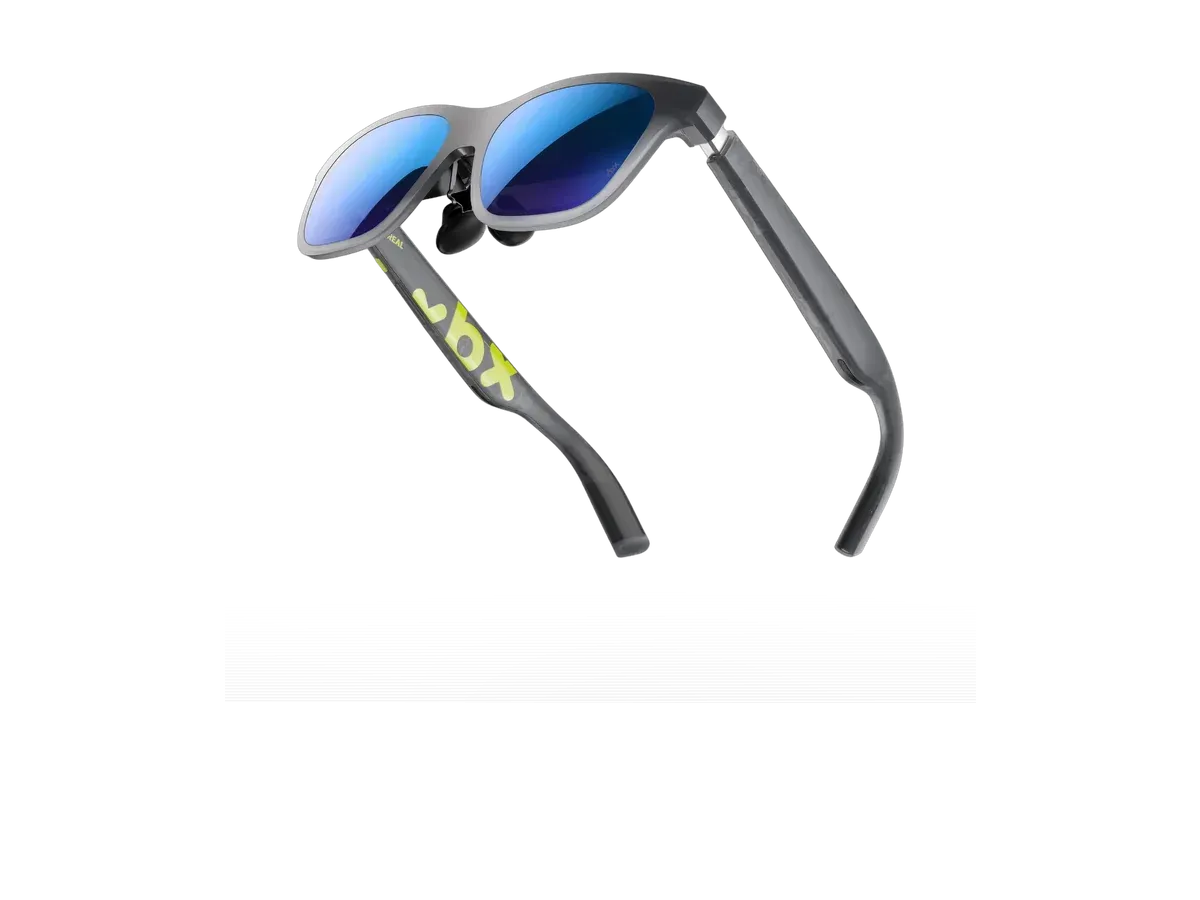
At a glance
- Display type
- Micro-OLED (SeeYa 0.6-inch, dual-layer)
- Resolution
- 1920x1080
- Field of view
- 50°
- Refresh rate
- 120 Hz
- Brightness
- 1600 nits
- Weight
- 62 g
- Very lightweight
- Solid display with HDR10
- No spatial computing
- No companion app
XREAL xbx a01+
XREAL
8/10 “According to the aggregated consensus of reviewers, the XREAL XBX a01+ is the budget pair that finally gives RayNeo real competition: $299 and a recorded 62 grams, with the spatial extras stripped out and the savings spent on brightness and comfort. Engadget scored it 9/10, calling it astoundingly bright and a dead-simple way into display glasses; TechRadar says XREAL may have just claimed the budget crown; Steam Deck HQ calls it a fantastic pairing for handhelds. Tom's Guide is more measured -- cheap and sort of cheerful, with plasticky build, fuzzy small text in productivity work, and a stabilization mode best left off -- and its head-to-head narrowly favors the Viture Pro 2 on adjustability. Scores below are an editorial aggregate of that cited coverage, not AR Compare hands-on measurements.” Read the full review$299
Check price at Amazon- Field of view
- 50°
- Weight
- 62 g
- Brightness
- 1600 nits
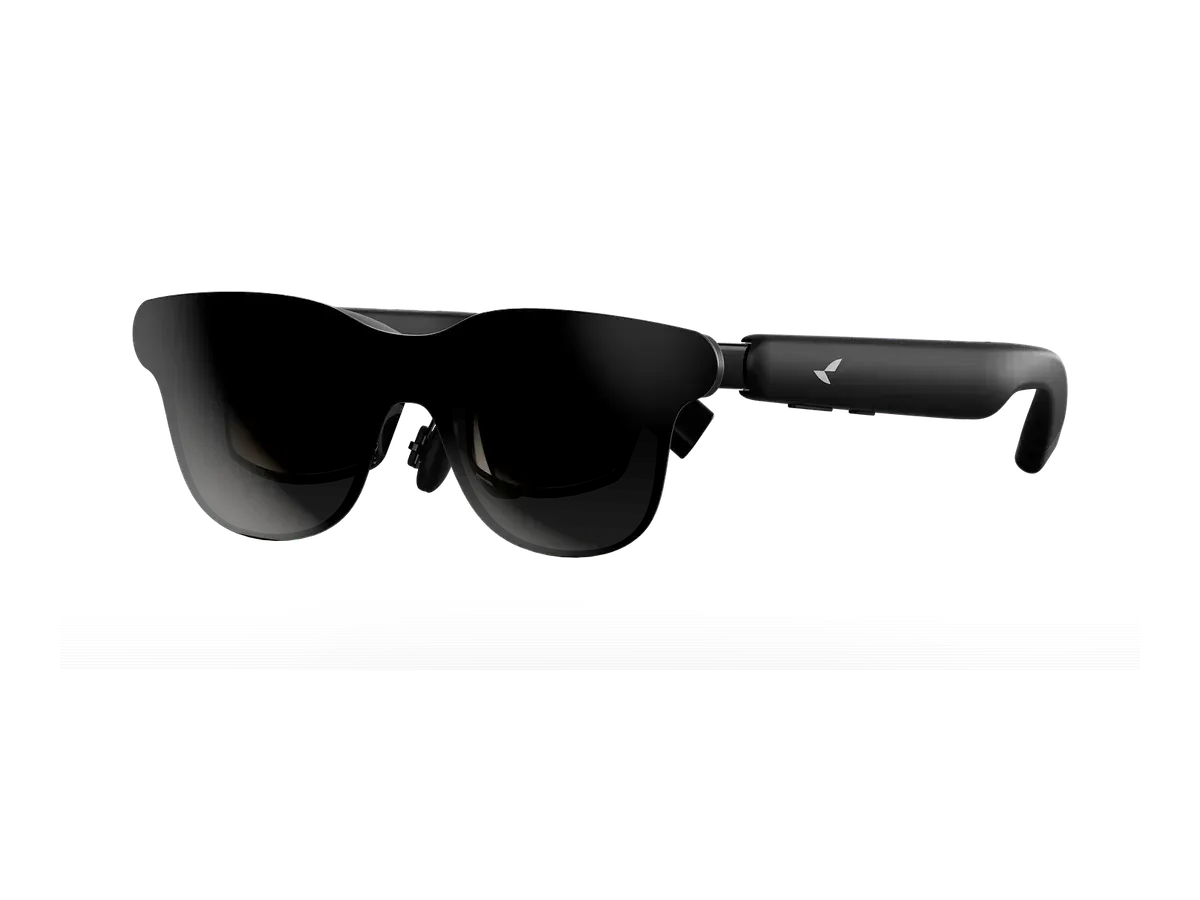
The XREAL xbx a01+ are display glasses for media, gaming, and productivity from XREAL, released 2026-07. They feature a 1920x1080 per-eye Micro-OLED (SeeYa 0.6-inch, dual-layer), 50° field of view, 1600 nits perceived brightness, 120Hz refresh rate. Weight is 62g. The base xbx a01 is sold only in China; the a01+ is the US model and adds a removable front frame, the sound modes, and a bundled magnetic blackout Light Shield. Nintendo Switch and older Lightning iPhones need an adapter. Best for: Budget buyers who want lightweight HDR10 display glasses without an app or spatial extras.
Our review
By AR Compare Team ·
According to the aggregated consensus of reviewers, the XREAL XBX a01+ is the budget pair that finally gives RayNeo real competition: $299 and a recorded 62 grams, with the spatial extras stripped out and the savings spent on brightness and comfort. Engadget scored it 9/10, calling it astoundingly bright and a dead-simple way into display glasses; TechRadar says XREAL may have just claimed the budget crown; Steam Deck HQ calls it a fantastic pairing for handhelds. Tom's Guide is more measured -- cheap and sort of cheerful, with plasticky build, fuzzy small text in productivity work, and a stabilization mode best left off -- and its head-to-head narrowly favors the Viture Pro 2 on adjustability. Scores below are an editorial aggregate of that cited coverage, not AR Compare hands-on measurements.
- Display quality
- 8.5/10
- Comfort
- 8.5/10
- Battery life
- 5.5/10
- Value for money
- 8.5/10
- Build quality
- 6.5/10
- Software
- 5.5/10
The XREAL XBX a01+ — sold under the new budget X by XREAL brand, and reviewed everywhere as the a01+ even though catalogs often shorten it to XBX A01 — is a $299 pair of display glasses that deliberately drops XREAL’s spatial computing features to hit its price. It launched in the US in July 2026; the plus-free base a01 is a China-only model. This review aggregates the hands-on record — Engadget’s scored review, Tom’s Guide’s long-haul travel review and its separate head-to-head against the Viture Pro 2, TechRadar’s vacation-length comparison against the RayNeo Air 4 Pro, and Steam Deck HQ’s handheld-focused test — alongside XREAL’s published specifications. AR Compare has not performed hands-on testing of this device; every observation below is attributed to the cited sources, and the category scores are an editorial aggregate of cited reviewer sentiment. Product facts were cross-checked against AR Compare’s spec record for the a01+ (dual-layer Micro-OLED at 1920x1080 per eye, a recorded 50-degree field of view, a recorded 1,600 nits, a 120Hz refresh rate, HDR10, roughly 62 grams, $299).
How This Review Was Compiled
Engadget published the fullest scored review (9/10) across work, gaming, and family life. Tom’s Guide’s Jason England tested the a01+ over 25,000 miles of travel and wrote the most tempered verdict, and his colleague Scott Younker wore it back to back against the Viture Pro 2 for a week. TechRadar’s Hamish Hector, a RayNeo Air 4 Pro owner, compared the two budget rivals directly, and Steam Deck HQ ran the deepest handheld testing, down to per-game battery and frame-rate measurements. Where the sources disagree — mostly on how the a01+ ranks against its two $299 rivals — both readings are reported below rather than smoothed over.
The Pitch: A Cheaper Screen, Nothing Else
Every source tells the a01+ story as subtraction: XREAL removed the things most buyers never use. There is no X1 chip, no 3DoF tracking, no companion app — just a bright 1080p screen in sunglasses form. Tom’s Guide argues that is the point, concluding that most people do not need fancy spatial tracking, they need a cheaper screen, and that scrapping the extras makes these glasses feel more focused. Engadget frames it as the easy on-ramp: much of what makes XREAL’s premium frames great, without the $599 XREAL One Pro’s price, and a simpler purchase than any camera-equipped smart glasses since there is nothing on board to raise privacy questions. The answer to the line-position question — what separates this from the XREAL One — is exactly that chip: the One family pins screens in space on-device, while the a01+ only mirrors whatever it is plugged into.
How Good Is the Display for $299?
Very good, with an asterisk about the edges. The recorded 1,600 nits is the headline: Engadget calls the brightness shocking for the class and usable in direct sun, and TechRadar notes it clearly beats the RayNeo Air 4 Pro’s 1,200-nit rating, giving the HDR10 support real room to breathe. Steam Deck HQ praises the OLED contrast and color coverage, and Engadget found the 147-inch virtual screen genuinely cinematic for video. The recorded 50-degree field of view carries some edge blurring that Tom’s Guide and TechRadar both note, though both judge it tolerable for games and video. Two quirks belong in any honest summary: enabling HDR drops the refresh rate from 120Hz to 60Hz or 90Hz per Tom’s Guide, and the AI SDR-to-HDR converter — praised by Tom’s Guide as a subtle, low-latency improvement — struck Steam Deck HQ as a case-by-case feature that over-saturates some games. Color tuning out of the box runs a little drained next to RayNeo’s per both Tom’s Guide pieces, and small text gets fuzzy in productivity work unless the interface is scaled up.
Does It Work With Steam Deck and Phones?
This is the a01+‘s strongest suit in the record. Steam Deck HQ reports it was recognized instantly by a Steam Deck, an Odin 3, an ROG Xbox Ally X, and an iPhone 15 Pro Max, with no configuration at all, and Engadget’s Steam Deck sessions worked flawlessly the same way. Steam Deck HQ’s measurements add useful fine print: the glasses draw roughly 1.5 to 2 extra watts from the Deck, and Deck owners choose between the default 720p output blown up on the 1080p panel (slightly soft, full performance) or native 1080p (sharper, measurably lower frame rates). That draw is the entire battery story — the a01+ has no cell of its own — so the battery score of 5.5 follows this site’s category convention for tethered display glasses rather than a standalone runtime. The hard limit is Nintendo: Switch and Switch 2 do not output video this way, and with XREAL’s own Neo dock canceled per Engadget, console play requires a third-party dock such as VITURE’s. iPhones and laptops mirror directly over USB-C, and prescription wearers can add roughly $50 clip-in lenses — which Steam Deck HQ warns loosen if swapped in and out repeatedly.
Comfort, Build, and the Odd Features
At a recorded 62 grams — about a C battery, in Engadget’s comparison — the a01+ wears lightly by every account. TechRadar dozed off wearing them on a sun lounger, Engadget wore them for hours of outdoor writing in a Georgia summer where a Vision Pro would have been unthinkable, and Tom’s Guide calls them a feather next to premium glasses. The dissent is minor: Steam Deck HQ found the arms clamp tightly at first, and heat builds on the left arm near the USB-C port — placed away from the head by design, but warm enough to notice when taking them off. Build quality is the record’s biggest reservation: Tom’s Guide describes the plastic as cheap-feeling and worries about longevity given hinge cracking on pricier XREAL models, and Steam Deck HQ calls the removable front frame thin and flimsy. That same snap-off front is also the most-liked design touch — XREAL publishes 3D-print files, and reviewers note a small scene of custom faceplates already exists. The one feature the record pans outright is stabilization mode: Tom’s Guide saw the image warp and ghost around fast motion even after a firmware update said to fix it, and Steam Deck HQ reached the same keep-it-off conclusion independently.
XBX A01+ vs Viture Pro 2 and RayNeo Air 4 Pro
The three-way budget fight has no unanimous winner, which is itself the finding. Tom’s Guide’s head-to-head narrowly recommends the Viture Pro 2 for its diopter wheels, seven nose-pad positions, and more tunable display, while giving the a01+ the edge on style, out-of-box comfort, and HDR — and calls the two nearly identical on paper. Against RayNeo, TechRadar’s advice is to buy whichever is cheaper on the day, noting the a01+ is brighter and lighter (a recorded 62 grams versus 76) while the Air 4 Pro counters with richer audio and a bigger virtual screen; TechRadar also records a $359 list price for the a01+ with the $299 figure as its regular discount, which is worth checking at purchase. Engadget and Steam Deck HQ, reviewing the a01+ on its own terms, both land unreservedly positive.
Value
At $299, the aggregated verdict is that the a01+ is one of the two or three best ways to spend the minimum on display glasses, and the single best if brightness, weight, or looks top your list. Engadget’s 9/10 calls it a dead-simple entry into the category; Steam Deck HQ says it is hard not to see the value for handheld owners. The tempering voices are about ceilings rather than flaws: Tom’s Guide reminds buyers the cost-cutting shows in the plastic and the text rendering, and productivity users — the one group every source cautions — should consider the Pro 2’s adjustability or a pricier pair with a sharper working view. Availability in the US runs through XREAL’s own store and Amazon per AR Compare’s spec record.
Who Should Buy the XREAL XBX A01+
Per the aggregated consensus: Steam Deck and handheld-PC gamers who want a big private screen with zero setup, travelers who want the lightest, brightest budget pair for flights and hotel rooms, first-time display-glasses buyers testing the category without spending flagship money, and anyone who enjoys the customizable snap-off faceplate. Who should skip: productivity workers who read small text all day, Switch and Switch 2 owners unwilling to buy a third-party dock, buyers outside the fixed pupillary-distance window, motion-sensitive users hoping stabilization mode would save them, and anyone who wants spatial pinning — that is what the XREAL One line is for.
Scores are aggregates of the cited reviews and hands-on reports, not AR Compare hands-on results.
Sources
- Engadget — Xreal XBX a01+ Review: Astoundingly Bright, Lightweight AR Glasses For $299 (9/10)
- Tom’s Guide — X By Xreal a01+ review: Cheap and (sort of) cheerful
- Tom’s Guide — Xreal xbx a01+ vs Viture Pro 2: Which AR glasses win?
- TechRadar — Xreal’s most stylish budget smart glasses give the RayNeo Air 4 Pro a real run
- Steam Deck HQ — XREAL xbx a01+ Review - XR Glasses That Feel Unreal For The Price Tag
- XREAL — XBX a01+ official product page (specifications)
What other reviewers say
1 review from an outside outlet.
Scores from other outlets, as published — not our rating.
| Source | Score |
|---|---|
| Engadget | 9/10 |
Pros & cons
Pros
- Very lightweight
- Solid display with HDR10
- Cool customization if you plan to wear them in public
- Plug-and-play across Steam Deck, ROG Ally X, phones, and laptops with zero configuration in reviewer testing
- Peak brightness reviewers describe as astounding for the class, holding a clear image even in direct sun
- An included blackout light shield that one reviewer says keeps the screen fully visible with light aimed at the face
- A snap-off front frame with official 3D-print files, so owners can make custom faceplates
- Open-ear speakers with standard, cinema, whisper, and surround modes, judged clear and detailed at close range
Cons
- No spatial computing
- No companion app
- Sound and screen size aren't quite as good as RayNeo's Air 4 Pro
- Stabilization mode warps the picture and ghosts around fast motion; reviewers advise leaving it off even after a firmware fix
- Cheap-feeling plastic that makes more than one reviewer nervous about long-term durability
- Small text turns fuzzy in productivity work unless the interface is magnified, per two reviews
- The left arm runs hot to the touch near the USB-C port during longer sessions
- No IPD adjustment, so buyers outside the stock pupillary-distance window should measure their eyes first
- Switch and Switch 2 cannot connect at all without a separately sold third-party dock
Full specifications
| Display | |
|---|---|
| Display type | Micro-OLED (SeeYa 0.6-inch, dual-layer) |
| Resolution | 1920x1080 |
| Field of view (°) | 50 |
| Refresh rate (Hz) | 120 |
| Brightness (nits) | 1600 |
| Virtual screen size (in) | 147 |
| HDR support | ✓ Yes |
| Color support | Full color |
| Not published: Pixels per degree | |
| Optics | |
| Optics type | birdbath |
| Prescription support | ✓ Yes |
| Prescription options | Inserts / lens frame via XREAL official lens service, -10.00 to +6.00, cyl up to 4.00, $49.90 sale / $149.90 list USD |
| Not published: Dimming control, Transparency level | |
| Physical | |
| Weight (g) | 62 |
| Foldable | ✕ No |
| Not published: Frame style, Color options, IP rating | |
| Connectivity | |
| Connectivity | USB-C (DP Alt Mode) |
| Compatible devices | iOS, Android, Mac, PC, Steam Deck, ROG Ally |
| Not published: Tethered | |
| Computing | |
| Operating system | iPhone 15/16/17, iPad, Android, Mac, PC, Steam Deck, ROG Ally |
| Not published: Processing type, Chipset | |
| Sensors & input | |
| Camera | ✕ No |
| Speakers | open-ear |
| Not published: Microphones, Tracking, Gesture control, Voice control | |
Prescription options
The documented prescription routes for the XREAL xbx a01+, from the maker and named-partner documentation recorded in our database.
- Inserts / lens frame via XREAL official lens service, -10.00 to +6.00, cyl up to 4.00, $49.90 sale / $149.90 list USD Source: tutorials.xreal.com documentation
Maker documentation as recorded 2026-09-17. Ranges are the maker's published limits, not medical advice — confirm your exact prescription with your optician before ordering.
Read the XREAL prescription guide for every documented option, model by model.
Where to buy
Price verified
XREAL xbx a01+ specs: quick answers
- What is the XREAL xbx a01+'s field of view?
- The XREAL xbx a01+ has a 50-degree field of view.
- What is the XREAL xbx a01+'s display resolution?
- The XREAL xbx a01+'s recorded per-eye display resolution is 1920x1080.
- How bright is the XREAL xbx a01+'s display?
- The XREAL xbx a01+ has a rated peak brightness of 1600 nits.
- How much does the XREAL xbx a01+ weigh?
- The XREAL xbx a01+'s glasses weigh 62g according to the manufacturer specification.
- How much does the XREAL xbx a01+ cost?
- The XREAL xbx a01+ costs $299.
XREAL xbx a01+: FAQs
How much does the XREAL xbx a01+ cost?
The XREAL xbx a01+ costs $299 (USD). It is available from 2 retailers listed on this page.
What field of view does the XREAL xbx a01+ have?
The XREAL xbx a01+ has a recorded field of view of 50 degrees.
How much does the XREAL xbx a01+ weigh?
The XREAL xbx a01+ weighs 62g according to the manufacturer specification.
Can I use the XREAL xbx a01+ with prescription lenses?
Yes, the XREAL xbx a01+ supports prescription lenses. The recorded diopter range is Prescription lens inserts (1.6 or 1.67 index); myopia to -10.00D, hyperopia to +6.00D, astigmatism to -4.00D.
What devices work with the XREAL xbx a01+?
The XREAL xbx a01+ lists compatibility with: iOS, Android, Mac, PC, Steam Deck, ROG Ally.
What resolution does the XREAL xbx a01+ have?
The XREAL xbx a01+ has a recorded per-eye resolution of 1920x1080. It refreshes at 120Hz.
Are the XREAL xbx a01+ good for gaming?
The XREAL xbx a01+ runs at a recorded 120Hz refresh rate with a 50-degree field of view -- the display specs that matter most for gaming.
Is the XREAL xbx a01+ worth it?
The XREAL xbx a01+ is priced at $299 (USD). For that you get a 50-degree field of view, 1600 nits of brightness, and a 1920x1080 per-eye resolution. It weighs 62g. The full spec breakdown on this page shows what the price includes.
Similar products
What shoppers cross-check with the XREAL xbx a01+ — from our navigation records and closest spec matches.

Ranked in these buying guides
Where the XREAL xbx a01+ lands in our recorded-spec rankings.
- Best AR Glasses for Gaming
- Best AR Glasses for Steam Deck
- Best AR Glasses for Movies & Travel
- Best AR Glasses for Productivity & Multi-Monitor Work
- Best AR Glasses for iPhone Users
- Best Budget AR Glasses & Smart Glasses
- Prescription Smart Glasses
- Best Everyday Smart Glasses
- The Best Smart Glasses of 2026
- AR Glasses Under $300
- Smart Glasses With a Display
- Lightest Smart Glasses
- Monitor Glasses: AR Glasses That Replace a Screen
- Best AR Glasses for Mac & MacBook
- Best AR Glasses for PC & Windows
- Best AR Glasses for Android Phones & Samsung DeX
- Best AR Glasses for ROG Ally & Ally X
- Widest FOV AR Glasses
- Brightest Smart Glasses
Related Comparisons
XREAL xbx a01+ vs VITURE Pro 2 XR Glasses
XREAL vs VITURE
XREAL xbx a01+ vs RayNeo GT
XREAL vs RayNeo
XREAL xbx a01+ vs XREAL 1S
XREAL
XREAL xbx a01+ vs XREAL One Pro
XREAL
XREAL xbx a01+ vs VITURE Beast XR Glasses
XREAL vs VITURE
XREAL xbx a01+ vs ASUS AirVision M1
XREAL vs ASUS
XREAL xbx a01+ vs ASUS ROG XREAL R1
XREAL vs ASUS
XREAL xbx a01+ vs Dream Glass Flow
XREAL vs Dreamworld
XREAL xbx a01+ vs GOOVIS G3 Max 3D Head Mounted Display
XREAL vs Goovis
XREAL xbx a01+ vs INAIR 2 Pro
XREAL vs INAIR
XREAL xbx a01+ vs Lenovo Legion Glasses 2
XREAL vs Lenovo
XREAL xbx a01+ vs RayNeo Air 2
XREAL vs RayNeo
XREAL xbx a01+ vs RayNeo Air 3s Pro AR/XR Glasses
XREAL vs RayNeo
XREAL xbx a01+ vs RayNeo Air 3s
XREAL vs RayNeo
XREAL xbx a01+ vs RayNeo Air 4 Pro
XREAL vs RayNeo
XREAL xbx a01+ vs RayNeo GT Max
XREAL vs RayNeo
XREAL xbx a01+ vs Rokid Max 2
XREAL vs Rokid
XREAL xbx a01+ vs Rokid Max
XREAL vs Rokid
XREAL xbx a01+ vs Rokid Station 2 Spatial Computing Host
XREAL vs Rokid
XREAL xbx a01+ vs Shadow Creator Honghu MR
XREAL vs Shadow Creator
XREAL xbx a01+ vs TCL NXTWEAR S+ AR Glasses
XREAL vs TCL
XREAL xbx a01+ vs TCL NxtWear S
XREAL vs TCL
XREAL xbx a01+ vs VITURE Luma Pro
XREAL vs VITURE
XREAL xbx a01+ vs VITURE Luma Ultra XR/AR Glasses
XREAL vs VITURE
XREAL xbx a01+ vs VITURE Luma XR
XREAL vs VITURE
XREAL xbx a01+ vs VITURE One Lite
XREAL vs VITURE
XREAL xbx a01+ vs VITURE One XR Glasses
XREAL vs VITURE
XREAL xbx a01+ vs VITURE Pro XR
XREAL vs VITURE
XREAL xbx a01+ vs XREAL Air 2 Pro
XREAL
XREAL xbx a01+ vs XREAL Air 2 Ultra
XREAL
XREAL xbx a01+ vs XREAL Air 2
XREAL
XREAL xbx a01+ vs XREAL Beam
XREAL
XREAL xbx a01+ vs XREAL One
XREAL