At a glance
- Display type
- Sony 0.55-inch Micro-OLED
- Resolution
- 1920x1080
- Field of view
- 57°
- Refresh rate
- 120 Hz
- Brightness
- 700 nits
- Weight
- 91 g
- 240Hz refresh rate is fastest in any wearable display -- double the 120Hz standard
- 3ms motion-to-photon latency for competitive gaming responsiveness
- Expensive at $849 -- a steep premium over mainstream display glasses
- Supply has lagged demand since the June 2026 launch -- both IPD sizes are sold out at XREAL's US store
ASUS ROG XREAL R1
ASUS
7/10 “According to the aggregated consensus of reviewers, the ASUS ROG XREAL R1 is a genuinely impressive pair of gaming glasses sold at a price the record cannot justify. Android Headlines calls it the coolest gaming experience in years, and Basic Tutorials rates it among the best gaming AR glasses available, praising the rock-solid anchor mode and deep OLED blacks. But Tom's Hardware answers the $849 question directly: the 240Hz headline is a software boost from a native 120Hz panel that blurred the image and strained the reviewer's eyes, and against the $599 XREAL One Pro the objective answer on value is no. Handheld-PC owners get the best of it; everyone else pays a steep premium for RGB flair and a dock. Scores below are an editorial aggregate of that cited coverage, not AR Compare hands-on measurements.” Read the full review$849
Buy at ASUS ROG Store- Field of view
- 57°
- Weight
- 91 g
- Brightness
- 700 nits
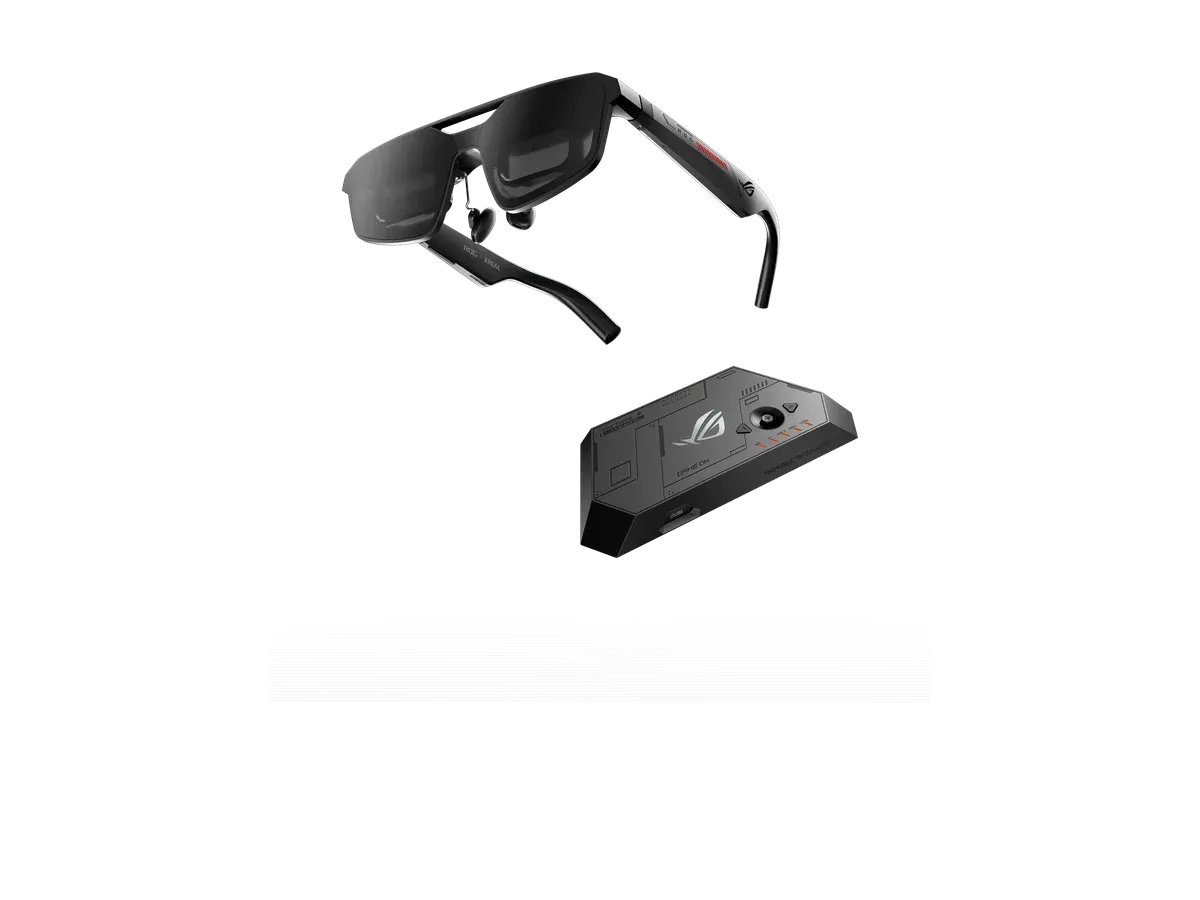
The ASUS ROG XREAL R1 is the world's first 240Hz Micro-LED gaming display glasses, created in partnership between ASUS Republic of Gamers and XREAL. Featuring a 171-inch equivalent virtual screen at 57-degree field of view, 3ms motion-to-photon latency, electrochromic auto-dimming, Sound by Bose audio, and the ROG Control Dock with DisplayPort 1.4 and dual HDMI 2.0 for seamless PC and console switching.
Our review
By AR Compare Team ·
According to the aggregated consensus of reviewers, the ASUS ROG XREAL R1 is a genuinely impressive pair of gaming glasses sold at a price the record cannot justify. Android Headlines calls it the coolest gaming experience in years, and Basic Tutorials rates it among the best gaming AR glasses available, praising the rock-solid anchor mode and deep OLED blacks. But Tom's Hardware answers the $849 question directly: the 240Hz headline is a software boost from a native 120Hz panel that blurred the image and strained the reviewer's eyes, and against the $599 XREAL One Pro the objective answer on value is no. Handheld-PC owners get the best of it; everyone else pays a steep premium for RGB flair and a dock. Scores below are an editorial aggregate of that cited coverage, not AR Compare hands-on measurements.
- Display quality
- 8/10
- Comfort
- 7/10
- Battery life
- 5.5/10
- Value for money
- 5.5/10
- Build quality
- 8/10
- Software
- 6.5/10
The ASUS ROG XREAL R1 is the first gaming-branded pair of display glasses: a Republic of Gamers collaboration built on XREAL’s One-series hardware, launched in June 2026 at $849 with a console-switching ROG Control Dock in the box. This review aggregates the hands-on record — Tom’s Hardware’s full review, Android Headlines’ two-week gaming review, Basic Tutorials’ long-form test across Xbox, PC, and phone, CGMagazine’s scored review, 9to5Google’s monitor-replacement experiment, and Geeky Gadgets’ early prototype hands-on — alongside ASUS’s published specifications and XREAL’s US store listing. AR Compare has not performed hands-on testing of this device; every observation below is attributed to the cited sources, and the category scores are an editorial aggregate of cited reviewer sentiment. Product facts were cross-checked against AR Compare’s spec record for the R1 — the core ROG XREAL R1 specs are dual Sony 0.55-inch Micro-OLED panels at 1920x1080 per eye, a recorded 57-degree field of view, a recorded 700 nits, a 171-inch virtual screen at 4 meters, electrochromic dimming, 3DoF tracking, roughly 91 grams, and a recorded $849 price.
How This Review Was Compiled
Tom’s Hardware’s Brandon Hill published the most critical full review, and the first to interrogate the refresh-rate claim in depth. Android Headlines’ Justin Diaz spent a couple of weeks gaming on it across PC and PS5 and wrote the most enthusiastic verdict. Basic Tutorials, a German outlet, ran the longest and most methodical test — Xbox Series X, PC, smartphone, the 2D-to-3D mode game by game, even re-weighing the glasses. A September 2026 re-check added two late-June reviews: CGMagazine’s Zubi Khan published the record’s only scored verdict, a 9/10, and 9to5Google’s Andrew Romero framed his review around whether the R1 could stand in for a monitor — his answer was no, but he kept it as a gaming companion anyway. Geeky Gadgets contributed brief prototype-stage impressions from before launch. Where the sources disagree, chiefly on the 240Hz mode and on what the R1 is worth, both readings are reported below rather than smoothed over.
Is the 240Hz Mode Real?
Partly — and this is the question that decides whether the R1 makes sense. The panels are natively 120Hz; the advertised 240Hz arrives through a Frame Rate Boost setting that Tom’s Hardware identifies as a software algorithm doubling the native rate. In that review’s testing the boost made the image blurrier with jitter at the edges of the view, enough to cause eye strain, on both the dock and a direct connection — while native 120Hz showed none of those anomalies. Tom’s Hardware concluded the mode was a novelty rather than something to rely on, with the honest caveat that the reviewer’s eyes sit just outside the R1’s supported IPD range, which may have sharpened the effect. The later coverage settles which way this dispute leans. 9to5Google reached the same verdict independently, reporting that the boost ‘sort of disintegrates that 1080p picture’, and CGMagazine — the review that scored the R1 a 9/10 — still describes the 240Hz signal as interpolation from the native panel rather than true output, and notes some text renders aliased with it on. Basic Tutorials adds that ASUS itself admits text can go softer at 240Hz, and that the boost is unavailable in the 2D-to-3D mode anyway. Android Headlines alone simply enjoyed the high-refresh smoothness in Battlefield 6 without noting artifacts. Counting opinions across the five reviews that used the mode, three report visible degradation, one documents the artifacts while scoring the package highly anyway, and one noticed nothing wrong — so the consensus has hardened since launch: treat the spec as an excellent 120Hz panel with an optional, imperfect doubler, and read the 240 on the box as marketing.
Display, Anchor Mode, and the Control Dock
Set the asterisk aside and the display record is strong. Basic Tutorials calls the Micro-OLED black level impressive, with shadow detail surviving in a game as gloomy as The Medium, and Android Headlines rates the picture the best it has seen on glasses of this type. CGMagazine adds two caveats the enthusiasm needs: the recorded 700-nit peak trails brighter rivals — VITURE’s Beast records 1,250 nits in AR Compare’s catalog — which the review counts against the R1 for movie watching, and the advertised HDR10 support only tone-maps HDR content down to standard range, a detail buyers reading the box should know. The recorded 57-degree field of view draws the main optical complaint — Basic Tutorials finds the visible window simply too small at large screen sizes, pushing HUD corners out of comfortable view, and 9to5Google agrees from the other direction, likening the full-size view to a 27-inch monitor a couple of feet away, with edges that vignette and drift out of focus. Both gaming reviews solved it by shrinking the virtual screen or switching modes, and 9to5Google credits the adjustable virtual distance — the screen can be set anywhere from 1 meter to roughly 10 — with easing eye strain alongside a real monitor. Anchor Mode is the consensus standout: the screen stays pinned in the room like a wall-mounted TV, processed on the glasses’ X1 chip with no extra software. Basic Tutorials observed no drift across sessions of twenty minutes and more, 9to5Google’s summary is that it never moves and is always where it was left, and the electrochromic lenses automatically clear when you glance away from the screen — a touch reviewers found surprisingly natural. The included Control Dock earns its place for console owners: two HDMI 2.0 inputs plus DisplayPort, one-button source switching that Basic Tutorials found flawless between a laptop and a console, and PS5 and Xbox support confirmed across reviews. The gap is Nintendo: Android Headlines could not get the Switch 2 working either directly or through Nintendo’s dock, while Basic Tutorials notes the original Switch connects via its own dock. One power note: there is no onboard battery — the R1 draws power over USB-C or through the dock — so the battery score of 5.5 follows this site’s category convention for tethered display glasses rather than a standalone runtime.
Comfort, Eye Strain, and Audio
At roughly 91 grams — Basic Tutorials’ scale read 92 — the R1 wears lighter than the number suggests. Android Headlines calls it comfortable enough for hours of Forza Horizon 6 thanks to multi-directional temple hinges, and Basic Tutorials reports no dizziness or headaches at all. 9to5Google found the fit easier to dial in than on earlier display glasses — three nose-pad sizes, spring-loaded arms, a stepped hinge for angling — and reports that once adjusted the glasses sort of disappear on the face. The honest limits: pressure on the nose and ears arrives after about an hour per Basic Tutorials, warmth builds near the eyebrows, and after two hours of gaming that outlet’s eyes felt more strained than a comparable monitor session — it judges ASUS’s own guidance of a ten-minute break every 45 to 60 minutes realistic. Audio splits the record in an unusual way: the Bose-tuned speakers themselves please everyone — Android Headlines found them booming and close to headphone quality, Tom’s Hardware calls them decent with respectable bass, and 9to5Google was impressed by both volume and quality while conceding they will not beat dedicated earphones — but Basic Tutorials measured the leakage bluntly, reporting dialogue nearly intelligible to someone a meter away. The microphone, by contrast, is a quiet triumph: bright, clear, and noise-free in Discord and Teams calls per Basic Tutorials.
Value: Is the R1 Worth $849?
This is where the consensus genuinely divides, and the September 2026 re-check widened the split rather than closing it. The catalog price is $849, which Tom’s Hardware quotes as $849.99 and Basic Tutorials as around 900 euros — and it is worth flagging that early hands-on coverage, including Geeky Gadgets’ prototype preview, floated a $700 estimate that did not survive to launch. Tom’s Hardware runs the comparison that matters: the XREAL One Pro shares the flat-prism optics, the recorded 57-degree view, and much of the internals at $599, so the R1 asks roughly $250 more for the boost mode, RGB lighting, and the dock — and on whether that premium is worth it, the review’s objective answer is no. It extends the same verdict against budget pairs like the RayNeo Air 4 Pro, which Tom’s Hardware quotes at $239 street (AR Compare’s record lists it at $299). CGMagazine takes the opposite position outright, scoring the package 9/10 and judging that the tech justifies what it calls the otherwise eye-watering cost of entry — so the record now holds a firm no and a firm yes on the same price, with Android Headlines’ wonderful-if-luxury framing and Basic Tutorials’ buyers-who-know-what-they-want conclusion in between. One market fact sits alongside the argument: as of a September 14, 2026 check, XREAL’s US store lists both IPD sizes of the R1 sold out at $849, with new stock expected to ship in September 2026 — whatever reviewers think of the premium, demand has outrun supply since launch.
Who Should Buy the ASUS ROG XREAL R1
Per the aggregated consensus: handheld-PC gamers — ROG Ally, Claw, and other USB-C DisplayPort devices — who want a one-cable 171-inch screen anywhere, console players who value the dock’s instant switching between a PS5 or Xbox and a PC, and ROG fans who want the anchor mode, auto-dimming, and lighting in one package and can afford the premium. Who should skip: value-focused buyers, for whom the cheaper XREAL One Pro delivers most of the same experience; competitive players expecting true 240Hz motion clarity from what is natively a 120Hz panel; movie-first buyers, who per CGMagazine are better served by brighter panels and real HDR than by a gaming-tuned 700-nit display; Switch 2 owners, since the console does not work with it at all; anyone doing text-heavy work; and eye-strain-prone users who cannot commit to regular breaks.
Scores are aggregates of the cited reviews and hands-on reports, not AR Compare hands-on results.
Sources
- Tom’s Hardware — Asus ROG Xreal R1 Review: Gaming-focused AR glasses deliver 240 Hz performance and RGB style
- Android Headlines — ASUS ROG XREAL R1 Review: The Coolest Gaming Experience In Years
- Basic Tutorials — Asus ROG XREAL R1 Review: AR Glasses with a Virtual 171-Inch Screen
- CGMagazine — ASUS ROG XREAL R1 (XR Glasses) Review
- 9to5Google — The ROG XREAL R1 gaming glasses might not replace your display, but they make a great addition
- Geeky Gadgets — Hands-On With ASUS ROG XREAL R1 240Hz XR Gaming Glasses
- ASUS — ROG XREAL R1 official product page (specifications)
- XREAL — ROG XREAL R1 US store listing (price and availability)
What other reviewers say
1 review from an outside outlet.
Scores from other outlets, as published — not our rating.
| Source | Score |
|---|---|
| Tom's Hardware | a real testament to what's possible when two companies at the top of their game work together on a singular product |
Pros & cons
Pros
- 240Hz refresh rate is fastest in any wearable display -- double the 120Hz standard
- 3ms motion-to-photon latency for competitive gaming responsiveness
- ROG Control Dock with DP 1.4 + dual HDMI 2.0 for PC/console switching
- Sound by Bose spatial audio tuned for gaming
- Electrochromic auto-dimming adjusts based on gaze direction
- A frame-anchored display mode reviewers call rock-solid, with no drift across twenty-minute sessions and lenses that auto-clear when you glance away
- Handheld-PC pairing is the consensus sweet spot: one cable to a compatible handheld for a giant private screen anywhere
- A microphone one review rates exceptionally clear for calls and voice chat, filtering out keyboard and fan noise
- OLED black levels that keep shadow detail visible in dark games, a repeated reviewer highlight
- Prescription lens frame ships in the box rather than as a paid add-on
Cons
- Expensive at $849 -- a steep premium over mainstream display glasses
- Supply has lagged demand since the June 2026 launch -- both IPD sizes are sold out at XREAL's US store
- 91g is heavier than competing display glasses like XREAL Air 2 Pro (75g)
- Gaming focus may compromise versatility for productivity use
- Advertised 240Hz is a software boost of the native 120Hz panel that reviewers found blurrier than native output
- The headline high-refresh mode is a software boost from the native 120Hz panel; the most detailed review saw blur, edge jitter, and eye strain with it on
- Two hours of play left reviewer eyes more strained than a monitor session, with the maker itself recommending ten-minute breaks each hour
- Open-ear audio leaks badly for a device this price: one review found dialogue nearly intelligible a meter away
- Real-time 2D-to-3D conversion swings from impressive to unusable depending on the game, with visible halos in one title
- Small text renders soft, and reviewers say serious competitive play still belongs on a monitor
- Reviews question the premium over the XREAL One Pro, which shares much of the hardware without the boost mode or dock
Full specifications
Specs last verified
| Display | |
|---|---|
| Display type | Sony 0.55-inch Micro-OLED |
| Resolution | 1920x1080 |
| Pixels per degree | 40 |
| Field of view (°) | 57 |
| Refresh rate (Hz) | 120 |
| Brightness (nits) | 700 |
| Virtual screen size (in) | 171 |
| HDR support | ✕ No |
| Color support | Full color |
| Optics | |
| Optics type | prism |
| Dimming control | ✓ Yes |
| Transparency level | electrochromic auto-dimming |
| Prescription support | ✓ Yes |
| Prescription options | Inserts / lens frame via XREAL official lens service, $59.90 sale / $159.90 list USD (R1-specific SKU) |
| Physical | |
| Weight (g) | 91 |
| Frame style | gaming glasses |
| Color options | Black |
| Foldable | ✓ Yes |
| Not published: IP rating | |
| Battery & power | |
| Charging method | USB-C (powered by ROG Control Dock or host device) |
| Not published: Battery life, Charging time | |
| Connectivity | |
| Connectivity | USB-C, DisplayPort 1.4, HDMI 2.0 |
| Tethered | ✓ Yes |
| Compatible devices | ROG Ally, Windows PC, PlayStation, Xbox, Nintendo Switch |
| Computing | |
| Processing type | tethered |
| Operating system | PC, Xbox Series X/S, PS5, Nintendo Switch (via dock), Android/iPhone, ROG Ally |
| Chipset | XREAL X1 chip (3ms M2P latency), 0.01ms panel response |
| Sensors & input | |
| Camera | ✕ No |
| Speakers | open-ear · spatial audio |
| Tracking | 3DoF |
| Not published: Microphones, Gesture control, Voice control | |
Prescription options
The documented prescription routes for the ASUS ROG XREAL R1, from the maker and named-partner documentation recorded in our database.
- Inserts / lens frame via XREAL official lens service, $59.90 sale / $159.90 list USD (R1-specific SKU) — range not published by the maker Source: tutorials.xreal.com documentation
Maker documentation as recorded 2026-09-17. Ranges are the maker's published limits, not medical advice — confirm your exact prescription with your optician before ordering.
Where to buy
Price verified
ASUS ROG XREAL R1: connectors and console paths
The ASUS ROG XREAL R1 is the only product in our catalog recording DisplayPort 1.4 and HDMI 2.0 inputs alongside its USB-C glasses connection — an adapter-free path from a console to the glasses. Each row derives from the recorded host list and the recorded ports; console classes route over the port their hardware outputs.
| Recorded host | Port | Connection path |
|---|---|---|
| ROG Ally | USB-C | Direct USB-C (DisplayPort Alt Mode) — no dock needed. |
| Windows PC | DisplayPort 1.4 | DisplayPort 1.4 into the included dock, or direct USB-C from a port carrying DisplayPort Alt Mode. |
| PlayStation | HDMI 2.0 | HDMI 2.0 into the included dock — the console stays plugged in, no HDMI-to-USB-C adapter. |
| Xbox | HDMI 2.0 | HDMI 2.0 into the included dock — the console stays plugged in, no HDMI-to-USB-C adapter. |
| Nintendo Switch | HDMI 2.0 | Nintendo dock HDMI out into the included dock — a desk setup, not a portable one. |
vs the XREAL One Pro: what the price gap buys
Same picture, different plumbing: the ASUS ROG XREAL R1 and the XREAL One Pro record the XREAL X1 chip, 120 Hz native refresh, 1920x1080 per eye, 700 nits, a 57° field of view, and the same 171-inch virtual screen. The $250 gap ($849 vs $599 recorded) buys the connector story above — the dock's DisplayPort 1.4 and HDMI 2.0 inputs. The extra hardware costs 4 g on the nose (91 g vs 87 g).
If your gaming spans HDMI consoles and a PC, that plumbing is the value; if you plug in one USB-C device, the XREAL One Pro delivers the same core picture for less — the full comparison has the line-by-line.
ASUS ROG XREAL R1 specs: quick answers
- What is the ASUS ROG XREAL R1's field of view?
- The ASUS ROG XREAL R1 has a 57-degree field of view.
- What is the ASUS ROG XREAL R1's display resolution?
- The ASUS ROG XREAL R1's recorded per-eye display resolution is 1920x1080.
- How bright is the ASUS ROG XREAL R1's display?
- The ASUS ROG XREAL R1 has a rated peak brightness of 700 nits.
- How much does the ASUS ROG XREAL R1 weigh?
- The ASUS ROG XREAL R1's glasses weigh 91g according to the manufacturer specification.
- How much does the ASUS ROG XREAL R1 cost?
- The ASUS ROG XREAL R1 costs $849.
ASUS ROG XREAL R1: FAQs
How much does the ASUS ROG XREAL R1 cost?
The ASUS ROG XREAL R1 costs $849 (USD). It is available from 1 retailer listed on this page.
What field of view does the ASUS ROG XREAL R1 have?
The ASUS ROG XREAL R1 has a recorded field of view of 57 degrees.
How much does the ASUS ROG XREAL R1 weigh?
The ASUS ROG XREAL R1 weighs 91g according to the manufacturer specification.
Can I use the ASUS ROG XREAL R1 with prescription lenses?
Yes, the ASUS ROG XREAL R1 supports prescription lenses. The recorded diopter range is Lens insert frame included (no lenses); fitted at an optician or ordered from XREAL ($59.90).
What devices work with the ASUS ROG XREAL R1?
The ASUS ROG XREAL R1 lists compatibility with: ROG Ally, Windows PC, PlayStation, Xbox, Nintendo Switch.
What resolution does the ASUS ROG XREAL R1 have?
The ASUS ROG XREAL R1 has a recorded per-eye resolution of 1920x1080. It refreshes at 120Hz.
Are the ASUS ROG XREAL R1 good for gaming?
The ASUS ROG XREAL R1 runs at a recorded 120Hz refresh rate with a 57-degree field of view -- the display specs that matter most for gaming. It is tethered, drawing video from a connected phone, PC, or console rather than running games on its own.
Is the ASUS ROG XREAL R1 worth it?
The ASUS ROG XREAL R1 is priced at $849 (USD). For that you get a 57-degree field of view, 700 nits of brightness, and a 1920x1080 per-eye resolution. It weighs 91g. It is tethered, so it needs a connected phone, PC, or console to run rather than working on its own. The full spec breakdown on this page shows what the price includes.
Similar products
What shoppers cross-check with the ASUS ROG XREAL R1 — from our navigation records and closest spec matches.
Ranked in these buying guides
Where the ASUS ROG XREAL R1 lands in our recorded-spec rankings.
- Best AR Glasses for Gaming
- Best AR Glasses for Movies & Travel
- Best AR Glasses for Productivity & Multi-Monitor Work
- Prescription Smart Glasses
- Sport Smart Glasses: Best for Running & Fitness
- The Best Smart Glasses of 2026
- Smart Glasses With a Display
- Lightest Smart Glasses
- Monitor Glasses: AR Glasses That Replace a Screen
- Best AR Glasses for PC & Windows
- Best AR Glasses for Nintendo Switch
- Best AR Glasses for PS5
- Best AR Glasses for Xbox Series X & S
- Best AR Glasses for ROG Ally & Ally X
- Widest FOV AR Glasses
- Brightest Smart Glasses
Related Comparisons
ASUS ROG XREAL R1 vs RayNeo Air 4 Pro
ASUS vs RayNeo
ASUS ROG XREAL R1 vs XREAL One Pro
ASUS vs XREAL
ASUS ROG XREAL R1 vs Lenovo Legion Glasses 2
ASUS vs Lenovo
ASUS ROG XREAL R1 vs VITURE Luma XR
ASUS vs VITURE
ASUS ROG XREAL R1 vs VITURE Luma Ultra XR/AR Glasses
ASUS vs VITURE
ASUS ROG XREAL R1 vs ASUS AirVision M1
ASUS
ASUS ROG XREAL R1 vs Dream Glass Flow
ASUS vs Dreamworld
ASUS ROG XREAL R1 vs GOOVIS G3 Max 3D Head Mounted Display
ASUS vs Goovis
ASUS ROG XREAL R1 vs INAIR 2 Pro
ASUS vs INAIR
ASUS ROG XREAL R1 vs RayNeo Air 2
ASUS vs RayNeo
ASUS ROG XREAL R1 vs RayNeo Air 3s
ASUS vs RayNeo
ASUS ROG XREAL R1 vs RayNeo Air 3s Pro AR/XR Glasses
ASUS vs RayNeo
ASUS ROG XREAL R1 vs RayNeo GT
ASUS vs RayNeo
ASUS ROG XREAL R1 vs RayNeo GT Max
ASUS vs RayNeo
ASUS ROG XREAL R1 vs Rokid Max
ASUS vs Rokid
ASUS ROG XREAL R1 vs Rokid Max 2
ASUS vs Rokid
ASUS ROG XREAL R1 vs Rokid Station 2 Spatial Computing Host
ASUS vs Rokid
ASUS ROG XREAL R1 vs Shadow Creator Honghu MR
ASUS vs Shadow Creator
ASUS ROG XREAL R1 vs TCL NxtWear S
ASUS vs TCL
ASUS ROG XREAL R1 vs TCL NXTWEAR S+ AR Glasses
ASUS vs TCL
ASUS ROG XREAL R1 vs VITURE Beast XR Glasses
ASUS vs VITURE
ASUS ROG XREAL R1 vs VITURE Luma Pro
ASUS vs VITURE
ASUS ROG XREAL R1 vs VITURE One XR Glasses
ASUS vs VITURE
ASUS ROG XREAL R1 vs VITURE One Lite
ASUS vs VITURE
ASUS ROG XREAL R1 vs VITURE Pro 2 XR Glasses
ASUS vs VITURE
ASUS ROG XREAL R1 vs VITURE Pro XR
ASUS vs VITURE
ASUS ROG XREAL R1 vs XREAL 1S
ASUS vs XREAL
ASUS ROG XREAL R1 vs XREAL Air 2
ASUS vs XREAL
ASUS ROG XREAL R1 vs XREAL Air 2 Pro
ASUS vs XREAL
ASUS ROG XREAL R1 vs XREAL Air 2 Ultra
ASUS vs XREAL
ASUS ROG XREAL R1 vs XREAL Beam
ASUS vs XREAL
ASUS ROG XREAL R1 vs XREAL One
ASUS vs XREAL
ASUS ROG XREAL R1 vs XREAL xbx a01+
ASUS vs XREAL